1 free read left. Create a free account for unlimited reading + AI research.
Create free account
How to integrate Unity Analytics, ads & in-app purchases into your game with Unity Services
Key insights
6 takeaways- 01Unity facilitates cross-platform distribution by providing a pre-built infrastructure that handles the technical demands of scaling and monetization.
- 02Unity Services centralizes advertising, in-app purchases, and analytics within the editor to eliminate the need for managing individual backend communications with multiple app stores.
- 03The framework includes built-in test modes and code samples designed to validate transaction flows and user interactions prior to live deployment.
- 04Developers can track granular player behavior, such as coin collection and engagement metrics, using custom dashboards and heat maps to inform game balance and retention strategies.
- 05The platform supports diverse monetization models, including consumables, non-consumables, and subscriptions, through standardized classes that abstract store-specific technical requirements.
- 06Industry networking through local user groups and community meetups is identified as the primary method for talent acquisition and collaboration.
Ask AI about this video
Transcript
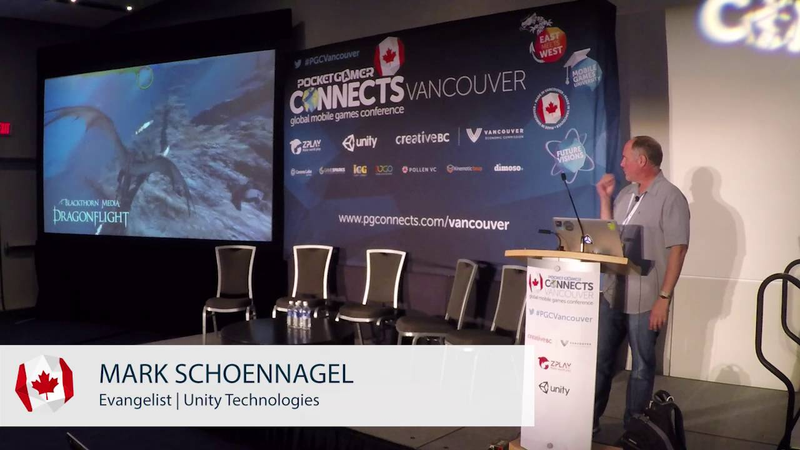
[Music] all right so she should I give everyone a minute or two to hop in or start up sure it's good feedback uh all right well you know what my little thing oh now it's starting to tick I got a little timer up there so I guess I'll start um shoot hey everybody my name is Mark shagal I work for uh Unity Technologies as a product evangelist um I'm based out of Los Angeles but I basically spend about 300 nights in a hotel so I don't really know where I live uh small disclaimer I flew in from Germany into Los Angeles yesterday morning and then flew and that was delayed and then flew in here last night so if I forget where I am just bear with me I'm a little jet laggy but anyway it should be good uh so what we're going to talk about today is Unity services
uh just kind of an overview of that some of the neat stuff that uh Unity does to make your life hopefully a lot easier and hopefully lets you make some good money so um we're all here to play games but if you're doing that for a living you're probably here to make a little cash too so we'll definitely talk about that uh I'm going to start off and just play uh our well it's 2015 showcase real I'm only halfway through 2016 so I haven't gotten the new one yet but anyway this is uh just a look at some of the cool games that were made with unity um yeah so I'll let just play for a second and uh then we'll talk some [Music] [Applause] [Music] [Applause] [Music] [Applause] more
[Music] [Applause] [Music] oh [Music] [Applause] [Music] oh
M love that [Music] [Applause] [Music] game [Music] [Applause] [Music] Gang Beast with the sixpack of beer is a very fun evening unless you have friends
[Music] more cool not bad huh one of the things I uh one the things I like so much about Unity is just the diversity of the games we're not really just great at one particular genre um as I think kind of shows uh just a quick show hands how many of you are I don't know would you say new to Unity none oh two over there all right perfect uh how many of you are programmers artists Gamers people that shouldn't be here no one okay good good all right so I'm going to tell you just a little bit about Unity for those of you that are new uh then we're going to dive into the editor uh I'm going to talk about uh well talk about services and then show you some stuff in the actual engine so uh for those of you that those of you that don't know Unity is a crossplatform
game uh engine we support 25 engines right now or 24 platforms right now um Blackberry poor little Blackberry is going to go away or I think it's already gone and uh Hollow lens is up there now so I have to update my slide but uh anyway so we support a lot of different platforms which is kind of a challenge to to keep all that current but uh thankfully we have some good Engineers back in Copenhagen who take care of that for us uh we actually have 19 offices there's 980 employees right now which is pretty amazing uh 2 and a half years ago when I joined it was half that number so we're uh we're definitely growing there's plenty of jobs out there on the job board if you're interested so check that out too uh lots of developers right now we're just hitting the 5 million registered developers Mark which is amazing so if you're using Unity you have questions you know go on the forums ask the community the community is amazing um they'll always be happy to answer your questions if our support team doesn't or or you don't have support whichever um we're an industry tool so you know we're used for a lot more than just video games I think you'll see us for simulations uh Oculus
says 90% of all the gear VR uh experiences are done with unity it's like 60% of all the Oculus Rift experiences so um VR is another great uh another great thing that we're we're going after so but we we we are really here to talk about services so we're not going to talk about all of those because uh I just don't have enough time for that but we do have a lot of very unique and interesting services that we offer at Unity uh most of these are available for in the free version as well uh for those of you that don't know we have a free version we have a pro version some other new versions have just come out which you can read about but uh essentially our services are unity ads analytics certification which is more of a a skill test uh Cloud build which uh we also won't talk about but that basically allows you to build your games your experiences in the cloud not use your own Hardware uh and waste your your own time and bandwidth uh collaborate which is just coming out every play which we'll talk a little bit about uh multiplayer which uh is brand new for us came out a few months ago which allows you to do all of your networking and matchmaking with uh hosts and all that good stuff uh which I'm going to do a
workshop here in town on Thursday but we won't be talking about that today and then performance reporting uh which we'll also maybe chat about a little bit um so some of the ones we are going to talk about today the biggest one is probably ads and analytics so ads are how you guys can make some money um one of the bummers about our industry and not sure whose great idea it was but we decided to come up with free games on mobile and that was kind of a bummer because everyone wanted to get their games out there but no one wanted to pay for form so how you going to make money when you're charging nothing for your games well you're either doing inapp purchases or you're you're throwing ads in there uh either one of those is really the only way unless you just feel like giving out your work uh which is fine too but you know the problem is 95 97% of all the people out there don't pay for a game which is definitely uh an interesting issue that we have in our industry um you know it's not quite that way on the console on the PC side but certainly on the mobile side one of I think the best examples of uh of ads to be used create ctively cleverly and
effectively is crossy roads how many of you have played crossy roads all right cool crossy roads is great it's mindless it's something to do with the grocery store when you're standing in line or whatever right quick endless fun uh but they did this they added this little tiny button right there which plays you an advertisement uh which will gain you 100 coins you can gain 100 coins in the game takes you a couple hours to collect all those as you're walking around or just watch a little 15c ad and suddenly you've got 100 coins and guess what those guys made I don't know like7 cents or something like that and unity made a little bit of cash on that as well so every time somebody clicked on that game someone made a little bit of money and a lot of people were playing this game so suddenly kind of overnight these guys became millionaires and I don't know exactly how many millions they made but they have made millions and millions and millions of dollars just by people click clicking that little button the nice thing about that little button it was never in your face you never saw an ad at the bottom of the screen that annoyed you it was always hey you want a little treat you want to get past this level faster you want to get this this extra character watch the video ad I think
that's the best way of doing it I'm going to show you how you actually integrate all that into a game um but you know it's just not in someone's face it really bothers me when you're playing a game or you download some weather app and you got all these stupid ads to look at uh someone's got to get make money but there should be in there could be better ways of doing it so Unity we have our own ad network uh it's called Unity ads and essentially they are full screen uh game relevant ads only you're not going to see ads for something like Depends undergarments or something like that which I've actually seen once uh on that little weather app which who wants to see that right you're playing a game I want to see game relevant ads if I'm even going to see an ad so all of the unity ads are our game relevant uh which is again a good thing uh analytics analytics are very very important they allow you to know exactly what people are doing in your game how they're doing it why they're doing it uh and it goes Way Beyond just who's playing it when they're playing it how they're playing it you can put in your own custom variables in there your own custom attributes uh and really figure out exactly what's going on this screenshot
right here looks a little bit interesting because it has all these green and red and yellow orange squares on it those squares aren't just artwork those are actually that's a heat map that's showing you where some sort of event took place and the quantity of events that actually took place at that so uh got a little video oh we got a video coming up soon oh yeah video is not yet video is coming um so when we talk about analytics there's four primary sections of that we have our core analytics our our Unity IAP which is in app purchases those are those things where you can buy spend a dollar here spend some coin there get some new armies get a get something whatever uh then there's raw data export which allows you to basically export the data visualize it any way you want pump it into Excel throw it into a spreadsheet into a database uh and take it off of our hands and you know do do something else with it and then there's heat maps and I'll talk more about heat Maps uh as we get to it as far as core analytics you get something like this that's your dashboard shows you how many people are playing it where they're spending their money how they're spending it you can see your you know your your oh you don't
see my mouse you can I can see my M there it is uh you can see how many people are playing it hey look people are playing more and more people are playing your game every day or you can see that hey people are less people are playing my game I better do some advertising better do some things uh all sorts of cool information is out there for analytics uh again things like active players number of sessions retention Revenue this dude has made 16 bucks with this game so that right there will get you a burger so that's a good day as work for fruit slasher whatever that is uh I don't know what that is um um yeah so again that guy there's a shot of hey the game launched and now things are going well and you can really start to see that pickup uh these are updated about twice a day um I do have a slight bit of a bummer my project that I want to show you today I didn't for kind of forgot about that so my heat maps are a little bit boring because I don't have a lot of data collected but I'll show you that in a little bit uh you can even see day night kind of Cycles going along which is pretty pretty interesting so um Ina purchases we have a whole set of API a whole bunch of whole bunch of tools that
makes this really really easy uh there's a lot of complexity within app purchases we I'll talk about once I'm actually in the editor showing it to you but we support all of the major platforms for inapp purchases each one of those vendors has their own API their own backend structure which you don't have to deal with it all you just say this is my product this is what I want to buy and we take care of all the hard work we we keep all that up to date for you uh so you don't have to make charts like that which I don't even know what that means but I don't think it's a chart we want to make so let's move on from there um yeah these guys right there so if you see where's Mouse there it is all these guys right there those are the different uh inapp purchasing uh stores that we support right now this list will grow uh I think Samsung wants to get in there as well uh and as these other stores start to appear we'll support their back end to make it a nice easy experience for you to pop those um into your game uh heat Maps this is where I want to show you a little video so heat Maps does that it gains insight into game specific spatial events sounds very exciting uh really just allows you to collect more
data than just who's playing it and why they're playing it allows you to figure out where people are dying on your levels where people are spending the most time on your level why aren't people going over there maybe there's some weird blocker that's getting in their way and heat Maps will show you all that uh and I'll just let oh this next one illustrate that here we go this is obviously a game called Dragon flight and unity analytics introduces heat Maps heat Maps are a visualization of spatial events where do players die where do they score kills which roads are the most traveled in your game by collecting the data from hundreds of thousands of players you can begin to assemble a large scale picture of how your players experience your game the pattern that emerge can help you tune the game and improve things like game economy difficulty curve or player fun sign up for Unity analytics today at analytics. unity3d.com yeah do that was use super simple uh this is the game
we're going to look at today this is the heat map for it it's just a little left right uh game where stuff is dropping down from you that's what it should look like unfortunately 3 weeks have passed since I last ran it and I was went on vacation and now it's sort of has no data in it so it's kind of boring looking so I got one an older one that looks a little better but we'll talk about that when we get to it uh lastly on the services side we have every play every play allows you to record your screen record what people are doing in your game and then actually uh dump that out to like a Facebook for your game type of a website that have at unity.com uh so it's really just a way for you to promote your game to get it out there without having to spend any money it's perfectly free uh some of these things go viral you know some great gameplay and it does record your screen so that dude there with the happy face in the Red Dot that's him actually playing the game so uh all of that gets added if you want it as well uh this is the one for crossy roads again as I mentioned it makes like a Facebook style page like we see there uh and there you go so lastly uh check out the blogs we have a lot of information a lot of good information our developers are not really required
but our developers are really good about writing blogs uh blogs on best practices blogs on all sorts of good stuff so uh that's it for PowerPoint which is great because I hate PowerPoint now I'm going to show you the unity editor um however if you stick around I'll show you that code and someone in here can win a free Unity Pro license or a subscription for a year or a ticket to unite so that's later um but for now let's go actually into the unity editor and take a look at a little game that just shows you how how you integrate these uh these different analytics inside of your project so uh this is my little game that we have and it's a very simple game it's just really designed to just show you the basics of inapp purchases of analytics how it all works so uh actually first let me reset my reset my score and all that good stuff now the reason my screen turns blue or purple when I press play that's just to let me know I'm in play mode uh it's a nice thing to know and I'm just going to go here touch my screen it says okay pick a character now notice I can't pick this character this character is is currently locked out uh I can pick this character
and from there I'm able to go and avoid the bombs well I did jeez really like let me try that again I was actually going to try to not die immediately but obviously I'm not very good uh anyway so bombs are falling okay you know what that's just fine that's how that game's going to work I'm not very good at it so I obviously need to make some inapp purchases to maybe boost up my my confidence or maybe just boost up my Army so I have a couple little buttons right here again this is designed to be very basic just to give you a taste of of how this all works so uh we have a button here for an ad if I click this one it'll play a Unity ad if I click this one it'll make an inapp purchase this is going to show show every play uh and this is going to just restart our level so first let's go ahead and do an inapp purchase so I'm going to click on ad and if I do this right this blue screen should come up because we're in the editor right now it's not actually going to fetch an ad and play it uh if I had compiled this for an Android iOS whatever platform this would then be showing me an ad right now and as long it says things seem to be working here
in the editor that means it's made a valid connection this is actually all live right now I'm connected to the internet it's connected to Unity servers and I'm now going to get I should have 10 more coins so there it is my awesome skills allowed me to collect one and then I watched the ad I got 10 watch another ad and now I've got 20 coins so that's sort of how you can use ads to I haven't shown you the code or how that actually works yet but that's the the functionality here in this game uh for inapp purchases I can click on this it's all right you know what I want to buy a new hero this hero right here doesn't have any amount of coin associated with it it could be okay you can't buy it until you have 100 coins or 200 coins whichever the crossy roads method but that's currently just a couple lines of code that's not in here uh but I can unlock the hero and when I do that this is now slightly grayed out so I can no longer uh fetch that character that's now been been done and the server recognizes that or I can go here and start to buy some coin now this is all legitimate what's happening right now it just looks like that number is just increasing but really it's actually talking to the unity server it's saying hey this this happened send back an okay
code that yes their transaction went through and pay because I'm in the editor we're not going to see the dialogue that pops up that says hey you're logged into Google play uh do you want to give this per do you want to you know that little that little dialogue that pops up that says everything's good same with iOS whatever um that only is going to pop up when you're actually running on the target device but if it actually does what it does and you see the result happen actually can see here in my console it'll Echo commands that say it was successful if it does that then you know you're good to go uh and there you go so how do we set all this stuff up it's actually fairly straightforward um first we want to click on our magical Cloud icon the magical Cloud icon brings up your services tab now normally uh when you first start off a project all of these say off and you have to register your project registering your project just basically tells the unity Services servers that this project is now alive you're working on it uh it's not turned on for prime time but at least it's on and you can now start to communicate with our servers and that goes for all of these different um services that we're going to talk about we won't talk
about all of them we won't talk about Cloud build or multiplayer but we do have some other ones um so if I click on ads there's not a whole lot that comes up with this uh with this particular tab uh one thing you want to make sure that you do is while you are building your game just make sure you're in test mode it's just better it's going to you won't charge yourself money essentially uh hey look I just bought five bucks of my own ads great thanks uh code samples there's some good code samples in there which I'll show you those as well uh when we actually look at the code that in my game uh but let's actually go back and take a look at some of the other ones we have analytics uh inapp purchasing let's take a look at analytics so when I click on analytics uh it's telling me blah blah blah blah how about just go to the dashboard cool let's go to the dashboard and that is going to fire up our analytics now come on oh jeez we need internet this is critical okay pH not good uh okay so this is our this is our little game it's called movie dude and basically once you start up you're given a bunch of prompts here as to how to get
your game going uh you can do all these yourselves but it's going to show you exactly what to do open your services window uh make sure that your IDs match that's just going to make sure that your ID on your project matches what the unity servers have 99% of the time that's going to be all set up fine uh what to do if it's not and then enable analytics and then once that's done you should be good to go it's going to say play to validate and I've already done this so this is all good current data that's telling me that yeah I made a couple transactions uh I had an ad reward ad re reward ad reward transaction I had a heat map for my player death and I also had Oh I thought I had some other ones in here well they must have been the last ones I did this kind of con oh there we go ad reward uh I watched an ad and I actually went through it and successfully watched it so uh this is just letting me know that it's working you don't really do anything with this this data it's just letting you see that the console basically got that data correctly uh if we go here to event manager to event manager this will start to show me some of the custom events Now by default uh
analytics is going to keep track of your active users how long they were using uh where they're from the basic stuff that you would expect but you can also embed your own analytics in there you can embed your own variables your own strings anything that you want the software to do just tell it hey where that where you die Mark that location where you spawn Mark that location every two seconds just give me a placeholder or a cookie crumb of where that player went you map thousands of players on there and you get a really good idea of how people are playing your game it's it's actually pretty cool to watch uh these are all of the custom commands that we've created custom attributes that we've created for this little basic game uh even as basic as it is did they watch the ads all the way through what character did they select did they click on in apppp purchases how many coins did they collect did they start the game all these little triggers that we put in there just because why not we can do it it's easy um if we then go to configure configure is there's one important thing about configure when you're generating Heat Maps you need this string right there which is
basically going to allow you to fetch that heat map uh that's under configure and when you do this the first time you'll have to answer a few more questions in there like your age and stuff like that for some legal reason whatever uh and then the first tab actually is probably the most important although in this example just because I've been out for a while uh there's not a whole lot of data logged so let's go and just increase our date range to maybe like uh let's go to say March and we can now see a bit more information so this game never made it out to the wild this is just a little internal internal project so at most we had seven people playing it a day uh and the only thing I'm looking at here is my monthly active users I could go here into my data Explorer and I could start to look at some other things uh here we're still looking at Daily act um uh daily users but I could say you know what give me a custom event I don't want daily active users on there anymore I want to see how many people uh collected a coin cool that's how many people people collected a coin so that was me last night trying
to populate some data uh but let's go back a few months let's go back to say March 1st and take a look and there we go so here we had a maximum of three players are playing my game holy cow three people in the whole world were playing my game on one day that's pretty awesome uh and this is just showing me the number of people who collected a coin unique users not how many coins they collected I could switch this tab here to the number of events the number of times they did it and we should see a refresh that shows hey look here on this day 30 six coins were collected in my game uh and obviously this looks a lot more exciting when you have a real project so just to show you there is live on the unity website there is a sample project which you can look at yourself which looks something like this uh shows you you know a lot more realistic data you can tear through this if you want uh only got a few more minutes left and I definitely want to show you more stuff in the editor so that's just the sample project there anyway what do we do once we're in the editor how does all this stuff work well I'm just going to show you just a couple things here uh the first one is on my UI canvas I have what the heck noise was
that uh I have this button here so this is my ad button in my game when someone pushes the ad button let's just go ahead and do it real quick uh let's be Grandma this time hey Granny hey I caught a coin hooray okay now she's dead poor Granny um so when I push this button right here it's going to do this right there so I'm going to stop that and what is it saying to do well uh basically I a class and my class is my game over controller and inside of that I have a function called show reward show rewarded ad so I want to take a look at what that code is and just kind of walk you through a little bit of that so here's my class game over controller funny joke outside and if we zoom in a little bit uh all this stuff up here is kind of not so important to what we're looking at uh and I'm not doing with every play uh what am I looking for where was that at there we go go show rewarded ad okay so this is the function that's called
when I push the button in that UI first it's going to check is the ad system ready is Unity are you talking to Unity has everything good yes it is okay and if that's the case we're going to do a result call back uh for the uh handle showed result and all that means is we're going to say there's three possible outcomes that could have happened from someone clicking on that button after they did they watch my ad did they skip my ad or did the ad fail so that's what the call back is going to return is whether they did that or not where they went uh and so once we get that result we're going to say all right well if they finish the ad if show result was finished then we're going to say okay the ad was successfully shown in the debug log so we know that's happening then we're going to take their score and we're going to give them plus 10 because that's the reward for watching an ad 10 coins uh then we're going to update the score string so everything looks good and there we go that's all good then we're also going to create a custom analytics event so that was that list of things that I showed you were custom and actually showed you the different coins that were collected it's just that little bit of code right there it says says hey you know what create this Custom Custom event this custom thing
inside analytics and keep track of it and fire this variable at it do that uh if they skip the ad well the ad was skipped and that's what's going to get logged in the debugger you're not going to get any coin you're not going to get anything else boom we're going right back to where we were and if it failed well we're going to get the log that it was failed and the same thing we're just going to get kicked back and returned so that's how easy it is to basically um get that ad to to show and also to uh to get that ad to um to make sure it was rewarded video now if I just wanted to show an ad I didn't care if it went through I didn't care if they made money on it or not this is really all the code you need so it's really simple it's only when you start to do error checking when you start to get a little bit more elaborate with it and make sure it's actually going to make sense in your game uh that you start to have to add some of this other code but essentially that's what's going to play your advertisement just show me an ad and it just does it and there you go and hopefully you made a little bit of money all right so that's that when we get to inapp purchases uh they're a little bit more complicated so for inapp
purchases we had another button there and that other little button said you want to gain 100 100 points let me show you that again really quick this time we'll use granny again we'll just make her die straight away ah poor poor girl uh so now when we do inapp purchases we can buy a new character or we can buy some coin now this is a little bit different coins are consumable uh that's a that's actually a term that we use with the system so a consumable item is something that you use then in the game to do something with so I could take those 100 coins I could consume them and buy a new character the character is non-consumable so granny is non-consumable I don't do anything with her after i i b sounds weird I don't do anything with her after I buy her uh no so I don't I just use that it's in my game and that's that right I'm not gonna I'm not exchanging her for any sort of a a you know some special thing so that's the difference between consumable and non-consumable and then there's also one third type called subscriptions subscriptions are just
that is it a subscription that every you know every month you have to pay a reoccurring fee to use that that uh that tool so anyway inside of our game here I have uh two buttons one of them is this button right there and one of them is this button right there I could have labeled those a little bit clearer but one of those is for coin uh the consumable and one of those is for granny the non-consumable so inside of there uh we have another class called uh what is that class called uh is that purchaser yeah and byproduct ID is what we're going to call so let's go ahead and take a look at that code as well I don't want to bore you too much with code but we'll take a look at some of it now this looks a little bit daunting right here all of this stuff right here comes straight out of the documentation and what this basically says and this is this takes care of a lot of hard work for you every single one of those store the Windows store the Apple Store the io the Android store they all have very different back ends how they communicate we don't want you to have to deal with any of that syntax every single one of those stores requires different hand hand shakes different ways of communicating what we've done is made
that really simple all you have to do is tell us what stores you're using and are you using consumable non-consumable or subscription and then create the store identifier now right now we're using test identifiers which is what you should be using when you're just uh uh testing your game once you sign up to be on the iOS store to be on the Android store they will then give you the proper things to fill in there to make sure it actually works but then everything else after that we take care of so we take care of the hard part of that process you just got to fill in the blank um so this just sets up where we're able to go and and see if these things are available at are these products available on the store uh once that happens we what am I looking for here now I'm Blinded By the Light um ah here okay so the next thing we want to do is create a builder a builder is basically going to be like populating our shopping cart but we have to first make sure that a the shopping cart item is there and that it's available at that store uh it's just technicalities but you have to do it so this basically
checks to make sure hey is that item available at Google hey you're available we're playing that game cool I want to buy that item uh once you've set up all that your store is essentially open for business and you just need to use that Command right there Unity purchasing installation and tell us what you want to buy once that happens now the magic starts up uh a little bit more code here and shoot I only have 12 seconds left so uh um shoot you know what uh this guy that's not the one I'm looking for this one right here so a few more things happen just a few little checks few little error Corrections things like that uh and then we have this guy right there uh M store controller initiate purchase once that command gets executed that's it that's when that dialogue pops up that shows you the Google logo uh asks for your password shows your little credit card information do you want to get that or not you hit yes if everything goes good then we get passed down further around the down the code to all that stuff is Apple fail state safe above that I could have SL stripped this down a little bit um but then here we
have all of our other stuff okay so if that was good then purchase was passed I it returns an okay value and then we add you know 100 bucks to the score we increase that on their on their actual uh score indicator and all is good or we unlock the character or we unlock those coins and there you go so I don't want to talk about code too much hopefully that was explained a little bit if your coder is great hopefully you get that if you're not well do a little research all this stuff is on the web uh in the help sheets and on the docs so you should be good to go with that uh I'm going to pop that URL up really really quick and give you all an opportunity to win a free license of unity so just go to this URL it is K sensitive um so you know take a picture of it whatever I'll leave that up for about 30 seconds and uh yeah you can either win a ticket to unite or you can win a uh a 12 month subscription to Unity Pro so there you go that went by faster than I thought thank you all there any questions by the way any questions hello
hello okay I have to use my very quiet voice ah gentleman there with the wristband you want this I'll give you this mic look at that hold you the mic boy where would you suggest uh finding great Unity developers well there's good news and bad news there's 5 million of them out there the problem is most of them are all picked up uh the best way for that I know of finding developers is going to user groups um go to meetup.com and just search for unity3d they're all over the place I do probably about a user group every other week and there's almost all of them have uh people looking for jobs or offering jobs uh we're going to start something really really soon at unity.com um which is basically a job proba letting the cat out of the bag a little bit we want to we want to try to empower artists and coders to get themselves out there as well and I wouldn't call it a job board but we want to recognize some of our our uh our
users that way and hopefully they help them get picked up um yeah it's a good question there's there's there's a lot of them out there there's a lot of a lot of people looking for them too but meetup.com is how I would go actually you know what check the unity user uh the unity website do a search for Unity user groups and all of the major user groups are listed and there's definitely one here in town so check that out uh and if you haven't I'm going to go for 30 more seconds if you haven't seen this go to YouTube and check out the Adam demo I'm going to skip forward just a little bit but this is the latest demo that our team in uh Stockholm have created and it's just it's just amazing it's beautiful it's stunning it's all in real time all on just the 970 it's it's pretty pretty crazy so anyway I'm over so I got to go thank you all very much
[Music]
Summary
Unity provides a comprehensive suite of integrated services designed to streamline the monetization and optimization of games across various platforms and genres. By centralizing tools for advertising, in-app purchases, and player analytics within the Unity editor, developers can bypass the complexities of managing backend communications with multiple app stores. This framework allows for the implementation of non-intrusive, contextually relevant advertisements and the tracking of granular player behavior, such as coin collection or engagement metrics, through custom dashboards and heat maps. These insights are essential for refining game balance and improving long-term player retention.
The technical implementation relies on standardized classes that abstract the requirements for different store environments, supporting various purchase models including consumables, non-consumables, and subscriptions. Developers are encouraged to utilize built-in test modes and provided code samples to validate transaction flows and user interactions before moving to a live deployment. This systematic approach ensures that developers can focus on creative execution while relying on a robust, pre-built infrastructure to handle the technical demands of cross-platform distribution.
Beyond technical tooling, the ecosystem emphasizes the importance of community and professional development. Networking through local user groups and community meetups remains the primary method for talent acquisition and collaboration within the industry. Furthermore, the company continues to push the boundaries of real-time rendering through high-fidelity technical demonstrations, signaling a commitment to both the functional needs of developers and the evolving visual capabilities of the engine. These combined efforts aim to provide a holistic environment where developers can build, monetize, and scale their projects effectively.








Comments