1 free read left. Create a free account for unlimited reading + AI research.
Create free account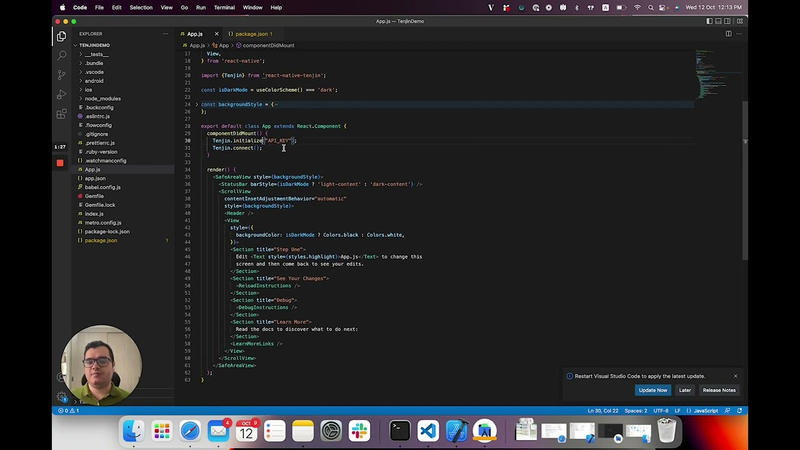
hello I'm Diego I'm a software engineer at engine and I'm going to show you how to easily integrate the react native plugin from tension so first what you need to do is to go to your apps folder in this case I named mine tangent demo creating it with the reg native CLI and then you do npm install react native tangent and these adds your tenants package to your packages uh after this you can just go to your apps code you can import a tangent from your native tangent and then uh the first thing you need to do is to initialize the dsdk
so this is the function uh the method to initialize the code uh you just need to call tangent.initialize and then as a parameter you can send your API key which is provided by changing and you can check it in 10 years dashboard um and after this we recommend uh calling the connect method uh and after this you can uh call any method you want like for example listening an event or opting in opting out you can get attribution info or sending a transaction a purchase transaction and uh you can do it up on uh buttons action or whenever you need to call them uh after this what you need to do is to go to your iOS project which is located in your iOS folder within your app and then you search for the info uh
uh that Palace file then you can open a source code and you can just add [Music] um a key here in this dictionary uh which is called NS tracking user's description and this is to comply with Apple's requirements and then this is a string and you can name it uh like for example we use uh your information to help you receive better ads uh after this you will be already set up on iOS and then with Android what you need to do is uh you can check our documentation
in our tangent react native SDK Ripple and you can get these dependencies which are needed to run a tangent into your Gradle so you can look for your build Gradle and here you can't add these dependencies which should install before you can run the project then you do Gradle sync and you're also ready to go on Android if you have any further questions you can contact us at support engine.com
Tenjin has introduced an official open-source React Native plugin to address the growing demand for cross-platform mobile development support. By enabling developers to build iOS and Android applications within a single environment, this integration extends Tenjin’s core attribution and analytics capabilities to a broader segment of the mobile app ecosystem. The plugin provides essential marketing infrastructure, including ad attribution, dashboard analytics, data warehousing, and the collection of impression-level revenue data, allowing developers to optimize campaign-level return on investment.
The integration process is designed for efficiency, beginning with the installation of the package via the React Native CLI. Developers initialize the SDK by providing a unique API key, followed by the execution of a connect method to establish the link with Tenjin’s servers. Once initialized, the SDK supports various event-tracking functions, such as recording purchase transactions or managing user opt-in preferences, which can be triggered by specific user actions within the application.
Platform-specific configurations are required to ensure full functionality and compliance. For iOS, developers must update the info.plist file to include the necessary tracking authorization strings to meet Apple’s privacy requirements. On the Android side, the integration involves updating the build.gradle file with the required dependencies and performing a Gradle sync. This standardized approach ensures that React Native developers can leverage the same data-driven insights and reporting tools previously reserved for native iOS and Android implementations, facilitating a more streamlined workflow for cross-platform mobile marketing and performance analysis.
The games and companies this document names on the inner ring, other documents about them on the outer one. Select a cover to see it up close and open it in a new tab; drag to move, pinch or Ctrl + scroll to zoom.
Tenjin · 2026

Tenjin · 2026
Tenjin · 2026
Tenjin · 2026
Tenjin · 2026
Tenjin · 2026
Tenjin · 2026
Tenjin · 2026

Tenjin · 2026
Tenjin · 2026
Tenjin · 2026
Tenjin · 2026
Two & a Half Gamers · 2026