VideoTwo & a Half Gamers
🤖 Building a UA reporting agent live, in 15 minutes by Matej Lancaric
25 Mar 202616 min video
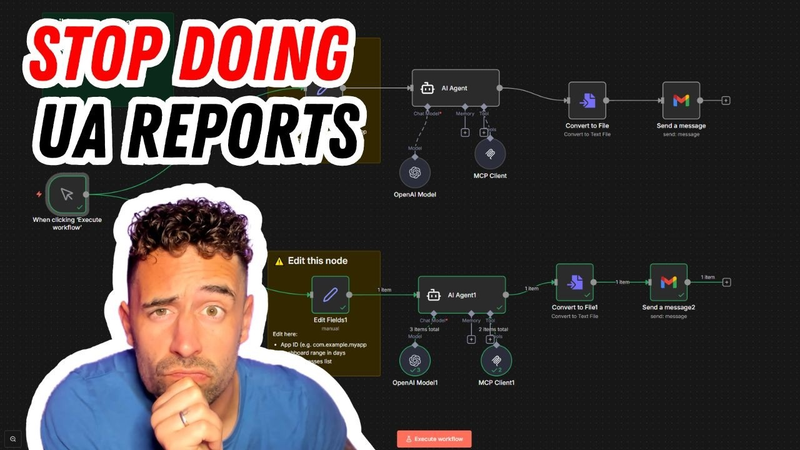
And this is an actual use case, how this can save 10 hours. I'm just joking, not 10 hours, but hours of your work before you actually go and start your week. Doesn't Does it sound cool? I think so. I think so. It sounds pretty cool and you can you can customize different templates and resources. And you know what's also cool? This is only the beginning.
[music] [music] [music] [music]
[music] [music] [music]
Hello everybody. This is Matej Lancaric and welcome to another solo episode. Today, this episode is going to be a little bit special because I'm just going to show you how I automated my weekly UA reporting using AppsFlyer MCP because every week I do the same thing. Open AppsFlyer. Then I open it again for different client. Then I share different data, build reports and again and again and again. And if I run campaigns for five, 10 clients it's a lot of time that I need to spend in dashboards
making reports. 10 dashboards and separate accounts, 10 sets of numbers to pull before I can say anything useful to anyone. And I can tell you I hate reporting. Yes, I hate it. I hate making reports. I don't hate the insights. I love the insights, but I hate the mechanical fact of doing this every week even though we have all the dashboards all the insights, all the data in one place. But you know, weekly meetings and you know it as well, weekly meetings, UA meetings, whatever else where you need to present things. And you can't just show dashboards. Unfortunately or fortunately, I don't know. Anyway, so I think this is a just giant waste of time. And this actually changed recently. I mean recently, I think if you follow me quite closely
then you know I was talking about this AppsFlyer follow release on my my Substack. So let me pull this up because I was talking about it and there were some interesting facts about their like 10 of their new uh new products. Pretty much I was talking about this. Look, let me share the screen here real real quickly. So blah blah blah, Signal Hop amazing thing obviously, but then there were like other things. Genetics suite. And I was like, okay, interesting. So there's like you can build different things obviously with all of these. So dashboard, again, weekly reports. And I was already talking about this in in November 2025. So I was like, oh, okay, how can I how can I work with this? And then I obviously forgot about it because well, work. But then I was like, okay, I should I should start paying attention to this.
Today I'm going to show you how to build this. I know it sounds or not sounds, it looks intimidating. But you know, it's not. Look, I can do this in less than 20 minutes. I think I can do it maybe in 10 minutes. So as I mentioned, I tested these products and today I'm going to show you how to set it up properly. It's actually very easy and this is only two clients. I can do more obviously. But you know, for you guys, if you have, you know, you're running one game and you don't have clients and you have your internal UA person, so you don't really need 10 10 nodes or 10 different accounts like I have. But okay, cut the crap. Let's do it like this. So what is MCP? So MCP stands for model context protocol for who for you who don't know. And it's too technical, but it's not.
And this is very simple. It open standard it's open it's an open standard less AI assistants like Claude, ChatGPT or whatever else or N8N connect directly to external tools and data sources. So instead of you manually reporting or exporting CSV and pasting it somewhere, AI does this for you in real time. And AppsFlyer has its own NCP server, which means your AI assistant can query your AppsFlyer data directly. Pulls installs, ROAS by campaign, creative performance, blah blah blah, whatever else. Pretty smart. And it's open source, which means it works directly with MCP compatible client like Claude desktop, ChatGPT, N8N and more. So you can do whatever you want. Pretty much I use N8N and if you remember I used N8N to automate an AI influencer for less than $80. And you can check it out, but this is not why I'm here. We are
here. We are here to actually go and do magic. Do magic. So you need to do few things. You need to connect MCP to your AI client and you need to get API key from OpenAI. And I'm going to show you where. So let's start with this pretty much. So as you can see, I already have an AppsFlyer AI agent key, but you can you go here create a new key, which is let's say MCP key. Default project or whatever, create a key. Take this key. And again, we go back here and paste it here. But I skip one important step. And that one important step is that if you don't know what you want to build, AppsFlyer has this knowledge GitHub, which is here. So if you want to actually get the template
because you don't know what you do you were going to do, you go here. I'm going to share all of these different links in the in the show notes so you can actually go there and and check it out. So let's say you go here and you have the executive summary, which is the the UA reporting that I'm going to build or you have the the caps alert, which again alerts you anytime you hit the spend cap. And there is the whole step-by-step guide. Here, you can do all of this. Again, you're not going to do this, but you can you can try and check it out. What we're going to do is let's try this like let's call it executive summary, but for me it's pretty much the UA reporting. All of these is everything is pretty much here. You can download the JSON file and then import. So if you do that and you go and import from here, let's say we're back in the N8N, you go here, import from file, you will get this pretty much.
So okay, you will get this and you need to go here, open, go and create new credentials. Open AI account, add your API key. Save. Perfect. Then okay, so we have here an MCP token. So here you create credentials. But how do you actually get that? I mean, it sounds way more intimidating than it actually is. So let me check. Let me go here. Let me log in to AppsFlyer. So let's say this is an AppsFlyer. Let's go to an account we have. So let's say let's go here. Then we need to go to the security center and obviously here manage your AppsFlyer tokens. So as I was playing around with these, I created few of these and I did it last month and you need to actually create new tokens because you want to have safe data. So you go here, create a new token.
Token name, MCP token token three, whatever. And then you go here and then create an MCP. Since I have an MC active NCP token already, I can't do it, but you will be able to do it. Then and this is this pretty much it. I mean, then we go here, we create new credentials and then paste this token here. That is it. See? What you also need to do is pretty much app name, add your app name here and then days to analyze, you can do seven days, one day, 30 days, whatever else, whatever days you want. And then you pretty much hit execute. And now you are looking at like the magic that happens. Let me just tell you one thing. And actually show you. You are going to get something like this. I was like, okay, this is nice. There's some this executive summary, you like metrics,
blah blah blah, and actionable recommendations." Okay. This is pretty much it. But then I was like, "Wait a second. This looks like um This looks nice, but let me check what I can what I can actually edit here. Cuz then the the one report you saw was pretty much model that was here by default, which was 4.1. And then you can obviously change the model to something which is more accurate because these days those those models are going live one after another very quickly. So, you can you can check the 5.2 model or you can select whatever else 5.4 these days, whatever else. And then so I did that, obviously, and look at how that report looks like now. So, what we did was just change the model. Very interesting. So, you know, you keep your your models uh
accurate and then fresh and uh you check it all the time. Again, like very customizable. You can do whatever you want. If if you want to edit the notes, you can you can easily do that pretty much every every time. So, I already got like one one report. I'm going to get another one, and it's pretty much easy. So, let's say we go and get this report, which was obviously I started doing this before we started recording, so I can show you how it actually looks like. So, we have full report with the revenues, clicks, whatever else. And then it's like signals. Okay, ROI is negative last 30 days, fine. It's why it matters, like all the different things. You can By the way, you can all customize all of this pretty much. And this is interesting because then you have actionable recommendations. So, confirm the cost injections and attribution mapping, validate the ROI definition. And honestly, it's a very good point because this revenue, obviously, it's not true because we started seeing cheaters, and we need to act on this.
So, imagine you don't really I mean, obviously, you go to dashboards, but and check all of these daily, but you get these into your into your email or into Slack or into Notion in or wherever you want to do it. So, you pretty much go in here. Okay, so so another report was already sent. Perfect. And you stack all of these. So, how Why is this is this interesting? Because you can customize all these metrics you care about, the CPA, ROAS, creative performance, budget pacing. You can do email, you can do Google Sheets, you can do Notion, Airtable, or anywhere Nathan can push the data, which is basically everywhere. You schedule it to run every Monday before you start your week, and you send it to you, to your client, to your team, wherever. It can can look like this, like pull last week last week performance, not the last 30 days, only last week, and flag anything that this uh the drop more than
15% week over week, and add like one line trend comment for each campaign. So, this output, again, goes anywhere you want. And as I as I as this is this is pretty much very straightforward. Uh you can do Zapier and whatever else, I guess, but Nathan for me does the trick because I used it already before. And this can be scaled to multiple accounts and multiple agent agentic setup. As you see and hear from everywhere, like agents are the future of whatever, and this is an actual use case how this can save 10 hours I'm just joking, not 10 hours, but hours of your work before you actually go and start your week. Doesn't Does it sound cool? I think so. I think so. It sounds pretty cool, and you can you can customize different templates and resources. And you know what's also cool? This is only the beginning. So, if you go here, I mean, this is kind of the
the the hub board, the knowledge sharing Upster uh page, where you can find all of the different workflows. And again, this is the start. This is the start, and we are building or well, we are building Upster is building new ones, and I'm also thinking about like what else we can build and I can build to make my life easier. Do you want to make your life easier on the UA side and actually pay attention to what matters, like thinking about creatives, doing like a creative research? Also, maybe, just maybe, in the future there's going to be an agentic connection to your favorite external creative research tool. So, everything that you do these days manually, it's going to be automated. Thank you very much, guys, for listening. Please, if you need any help, let me know in the comments. Check out the the newsletter. Check out the links in the show notes because this is very important, and it's
going to save you a ton of ton of time. See you next time. Thank you very much. Bye-bye.
Auto-generated captions from YouTube — names and numbers may be misheard.
Automating weekly user acquisition (UA) reporting is a highly effective strategy for mobile gaming consultants and growth marketers to reclaim time spent on manual data consolidation. By leveraging the Model Context Protocol (MCP), UA managers can connect AppsFlyer data directly to automation platforms like n8n, Claude, or ChatGPT. This integration eliminates the need for repetitive manual exports and dashboard navigation, allowing AI agents to query performance metrics—such as installs, return on ad spend (ROAS), and creative performance—in real time.
The setup process is accessible and requires no advanced coding. Users can utilize open-source templates provided by AppsFlyer, which include pre-built workflows for executive summaries and spend cap alerts. The technical implementation involves generating an AppsFlyer API token, configuring an MCP-compatible client, and connecting an OpenAI API key within an automation tool like n8n. Once established, these agents can be scheduled to generate reports automatically, flagging significant performance drops or anomalies, and delivering the insights directly to communication channels such as Slack, email, Notion, or Google Sheets.
This approach is highly scalable, allowing consultants to manage multiple client accounts simultaneously through a multi-agent setup. Beyond simple reporting, the framework is customizable, enabling users to adjust metrics, select specific AI models for improved accuracy, and define custom logic for trend analysis. As the technology evolves, future applications are expected to include automated creative fatigue alerts and direct integrations with external creative research tools. By shifting from manual data gathering to automated, agent-driven insights, UA professionals can focus their efforts on high-level strategy and creative optimization rather than mechanical reporting tasks.

Two & a Half Gamers · 2026

Two & a Half Gamers · 2026

Two & a Half Gamers · 2026

Two & a Half Gamers · 2026
Two & a Half Gamers · 2026

Two & a Half Gamers · 2026

Two & a Half Gamers · 2026

Two & a Half Gamers · 2026
Two & a Half Gamers · 2026

Two & a Half Gamers · 2026
Two & a Half Gamers · 2026

Two & a Half Gamers · 2026
Naavik · 2026
Deconstructor of Fun · 2026

Two & a Half Gamers · 2026
Two & a Half Gamers · 2025

Two & a Half Gamers · 2025

Deconstructor of Fun · 2025
Two & a Half Gamers · 2025

Deconstructor of Fun · 2025
GamingReport · 2025
Naavik · 2024
Deconstructor of Fun · 2024
Two & a Half Gamers · 2026
Comments