1 free read left. Create a free account for unlimited reading + AI research.
Create free account
SKAdNetwork Reporting in Tenjin (Dashboard Included)
Key insights
6 takeaways- 01Tenjin provides a centralized dashboard to ingest and analyze privacy-centric SKAdNetwork data for iOS 15 attribution.
- 02The reporting suite is available at no additional cost to all users who integrate the Tenjin SDK.
- 03The platform enables side-by-side comparison of install data reported directly by ad networks via API versus data reported by Apple to verify data integrity.
- 04Integrated reporting supports major ad networks including AppLovin, Facebook, Google Ads, and IronSource.
- 05Users can track granular post-install activity by monitoring conversion values, spend data, install counts, reinstalls, and assists.
- 06The dashboard allows for customized data filtering by channel, campaign, source app, or specific conversion values to optimize user acquisition strategies.
Ask AI about this video
Transcript
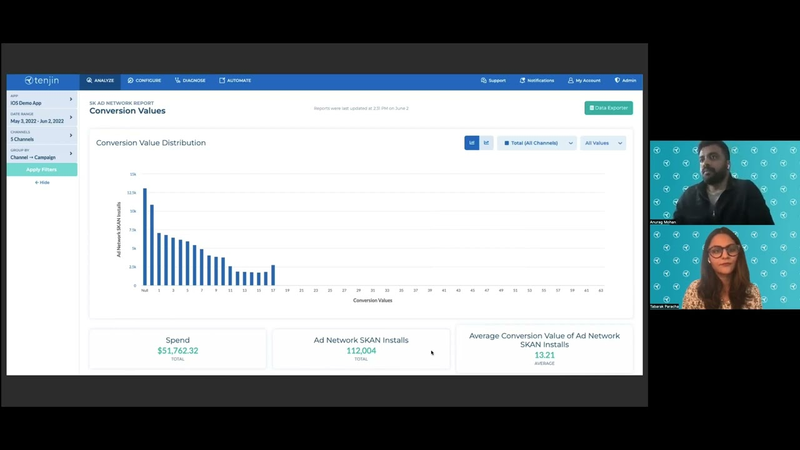
hi everyone um i'm tabarek from the marketing team at tengen hey guys uh my name is anurag i'm the customer success manager at tengen i handle the north america and south america markets and today we're going to be discussing scad network reporting in tanzania so anurag uh what is sk ad network and how is tenjin thinking about it so scad network is the new attribution solution from apple given the privacy changes that apple has made last year at engine we've been working with our customers to ensure that all of this data through the new attribution system is available on tension and customers can use this data to continue continue scaling their user acquisition networks and what sk ad network metrics can i access through its engine and where can i see them awesome so that's a great question so on dungeon we have a scat network dashboard
that actually allows you to view all of this data um so i'm just going to show you what the dashboard looks like so once you sign up with engine and integrate your sdk and set up your scad network campaigns this is how your data would look like on the scant dashboard so as you can see we also show you like the distribution of conversion values so when you're sending different conversion values to track post install activity of the users we will actually plot a graph for you sort of help you understand how the activity has been performing we also have the spend data for all of your campaigns now so you can see how much you're spending for all of these scan network campaigns and also populate the number of installs that we receive so if you look over here you can see that we break down this data by channel and campaign level so you would see um scat network data for all of those ad networks that you're running scad network campaigns on um and here you can see the spend that
you have and also the different type of installs given this new change of attribution now there are different type of installs that are being reported so this sort of dashboard helps you look at it all of it in one page so here you can see as an example the ad networks get installed so essentially this is the install um that we receive directly from the ad network postback saying that these many installs we got from the scan network system um the apple first installed essentially would be all of this all of this data that apple sends us directly so now what's happened is um with ios 15 you can get this data directly from apple what apple usually does is actually sends all of this data to an ad network and then an ad network sends it to you which is tension but now you have the ability with ios 15 users to get this data directly from mac so now you can sort of compare what apple is reporting and what the ad network's reporting and we also show you the reported installs and track installs which is reported installs being the
installs that the ad network tells directly from that api and draft installs is what we are tracking on our system so this way you can sort of see all of these installs in one page um talking about more metrics you can now see the different type of metrics that you can look at on this dashboard so here under edit columns you will be able to see the ad network installs reinstalls assists and all different kind of metrics and all you got to do is just select these metrics and just add it to the dashboard and you can see all of this data and similarly you can group it by different campaign conversion value your source app um and all of this filter can be like changed on the left side of our panel um do you have any questions at this point yes um what networks do you support for sql network yeah so we have a lot many networks now that are being supported at attention so here is just like a
quick overview of some of the networks so some like app loving facebook google ads iron source um most of the big networks that now supports cad network is also now supported on tension and once you start running these campaigns under net network so you can just go into the channel filter over here and select those channels that you want to look at and of course we have different um time ranges that you can select um and one of the cool things is all of this is free for you to use so all you got to do is just sign up attention integrate your sdk and all of this data would be available for you great thank you so much uh so this was a great overview for of rs cat network reporting intention if you do have more questions regarding the sql network report feel free to look at our documentation um at docs.tension.org or feel free to leave us a comment on this video or reach out to us at support
tension.com thank you thanks
Summary
Apple’s SKAdNetwork serves as a critical privacy-centric attribution framework for mobile user acquisition following recent industry-wide shifts in data tracking. To assist developers and marketers in navigating these changes, the Tenjin platform provides a centralized dashboard designed to ingest, visualize, and analyze SKAdNetwork data. By integrating the Tenjin SDK, users gain access to a comprehensive reporting suite that facilitates the continued scaling of advertising campaigns across major mobile ad networks.
The dashboard offers granular visibility into post-install user activity by tracking conversion values and plotting performance trends. Key metrics include spend data, install counts, and a comparative analysis of attribution sources. Specifically, the system distinguishes between installs reported directly by ad networks via API and those reported by Apple, allowing for a side-by-side comparison of data integrity. Users can further customize their reporting by filtering data by channel, campaign, source app, or specific conversion values, and by selecting from a variety of metrics such as reinstalls and assists.
This reporting solution supports a broad range of major ad networks, including AppLovin, Facebook, Google Ads, and IronSource. The platform is designed to be accessible to all users who integrate the SDK, providing a free, unified interface for managing the complexities of iOS 15 attribution. By consolidating disparate data streams into a single view, the dashboard enables marketers to maintain operational continuity and optimize their user acquisition strategies in an environment where traditional tracking methods are increasingly restricted.




















Comments