VideoPocketGamer.biz
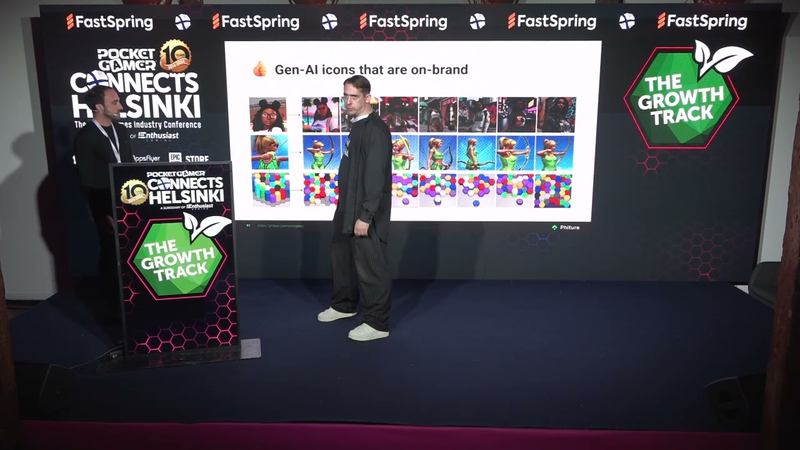
Session: Accelerating ASO Experimentation With Gen AI Using PressPlay - Mikey Feingold, Phiture
24 Oct 202521 min video
Transcript
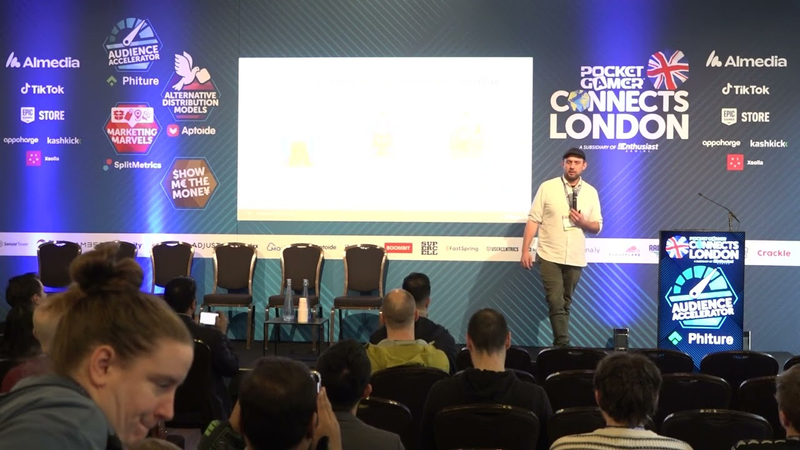
[Music] [Music] Heat. Heat. Right. Are you ready to uh taste that pink venom now? Because our amazing track sponsor feature. Honestly, K-pop lyrics sound so bad when they're spoken by me. Um, so instead of doing any more talking, I'm going to invite our track sponsor, Mikey Fangle from Feature up to the stage to talk about accelerating ASO experimentation with Gen AI using press play. I'm really excited about this one. Give him a round of applause, please.
Enjoy it.
Thanks very much.
Hello. Hi. I am Mikey um from Feature as we said and um we're a mobile growth consultancy and today I'm going to be talking about accelerating Play Store experimentation using Gen AI just like it says on the tin here. So, um I'll have to work out how to use this one. There we go. So um yeah, as I mentioned, we are a mobile growth consultancy helping brands grow um across mobile, web, and beyond. Um and this is just a snapshot of a number of clients that we've worked with kind of across the um gaming space and app space. So this um is just snapshot of some of the services that we offer from kind of ASO, CRM, um UA, we've got our own in-house creative teams as well as kind of a number of proprietary products, one of which, um I'll be focusing on today, which is um Press Play. So um in terms of actually looking at
the app store um I mean many years ago it was kind of a lot easier to kind of find yourself a good category ranking um whereas in today's world it is some mean feat. Um so I mean app store optimization revolves around visibility and conversion. So visibility essentially increasing your ability to be found within the app store and conversion actually um having people go on to download your app which obviously is what we all care about. So at feature we've developed kind of um our own framework. We've been doing ASO for a number of years. Um and so this is one of our frameworks which is the conversion rate optimization. Um and so you can see here that we start with kind of the research. We look at it from a number of different angles. Um and then we kind of move on to our hypothesis. Um once we've generated those hypotheses, that's then we when we move on to actually go on and prioritize prioritize those experiments um within the backlog itself. Um we then go on to create our
assets. So that can be anything from your icons, your screenshots, your feature graphics um as well as your videos before actually moving on to test those assets. And I mean we tend to do kind of a lot more experimentation with the Google Play framework um as it's a little bit more robust than the um kind of iOS native. Um and then we go on to do our reporting which of course underpins everything that we do. Um, so I mean what we're trying to do is obviously understand what is working, what isn't. And so it's not about just going through this loop once. It's of course going throughing it going through this loop over and over again. Um, and I think like whilst it's not the most complex loop itself, obviously we need time and resource that a lot of teams may not have in terms of being able to really kind of iterate on that process. And so as I said kind of it's not all that simple. Being able to actually run
tens or hundreds of experiments um can take a hell of a lot of time that a lot of people don't have. Similarly with capacity you need the resource. Not many people have the luxury of kind of these huge studios um that can plug in wherever needed. Um budget I mean something we all know about budget constraints. Um, and then time as well. Like if trying to find kind of the optimal screenshot order, for example, can take a hell of a long time and sometimes that is something that we may not be able to prioritize just from that time aspect. Perfect. Um, and so now moving on to actually press play itself. Um so press play is essentially used to really be able to kind of increase that testing velocity um without actually having any detriment to kind of the output um at a far more sustainable cost which I know on the face of it definitely sounds too good to be true but hopefully we'll we'll delve into it now. So in terms of
the core functionalities which kind of underpin underpin press play we've obviously got our scale. So being able to run kind of tens of hundreds of experiments um without the need for all of that resource. Um then automation actually being able to kind of set up everything within the tool. So you don't need to go in and manually adjust your experiments. Obviously again saving time but also adding an additional layer of flexibility kind of through different smart rules which I'll move on to later. And then finally the reporting. So actually being able to collect all of your results within one place regardless of kind of which elements you're testing whether that's across different titles um etc. So these are kind of the core functionalities. Um and then this is now an overview of the different elements that we can test. So, we've got our icons, our feature graphics, screenshot order testing, and short descriptions. So, icons is where we tend to typically see the biggest uplift. Um, but
obviously depending on kind of your app, different elements um kind of can hold different results. So, I'm going to predominantly focus on the icons and then I'll touch on a few of the other examples as well. So, just looking at kind of uh the process that we go through. So, we've got our initial icon. we can kind of choose whether we want to approve or reject that. We then go into our first round of testing. And as you can see here, we actually don't have that great results. That is not untypical from um for a kind of first round of testing. Um, and I think what's really important here is that we don't just see these as losses, but we actually understand how we can take the learnings from that, what's not working, and essentially how we can kind of continue to feed that back into the uh to the tool itself. So, we move on to testing round two. We can see that the results kind of are continually increasing before we finally get that win. And kind of seeing results of 15% um in terms of a kind of uplift
are not uncommon. And you know, as I mentioned, it's a very much iterative process. Even though we've got that win, what we're trying to do is kind of continually feed that back in. And so the next time we go through this process, hopefully we can kind of continue to build on that and see even better results. So this is just kind of a snapshot. I don't know what's happened to all of my arrows up top. Um, but yeah, so essentially what we do, we will kind of work in a seeding process initially to initialize that assistance. So that is kind of plugging in all of the brand guidelines, plug plugging in kind of dos and don'ts from the brand and just ensuring we're capturing everything that the brand needs to adhere to um before actually moving on to that hypothesis generation. Um, so you can see here we've obviously got kind of our icons, our short descriptions and feature graphics which have been churned out. And you know, you can get a number of these at any one time before actually selecting kind of which ones you're happy with and which ones you want actually want to add into your testing backlog. Um, so once we've got that, we
then work um in our deployment stage and everything is kind of um done through an automatized system. Um so actually using those rules which you kind of have complete control over yourself and can set them um to really kind of try and reduce that um manual intervention. Um and then as I mentioned kind of that key bit here the learnings collector. Um, so this is essentially where regardless of wins or losses, we are taking all of that information and plugging it back into the tool um to make sure that, you know, even if we're not getting the results that we want and expect, it's still able to provide some value. Um, so it's essentially never time wasted. Um so just moving on um into kind of the evolution of the tool itself. As much as we would have loved to think that it would have been perfect for first time around, we did kind of have our own challenges. Um things like icons not adhering to brand guidelines well enough. Um you know, not taking into
account a value proposition or looking at user research, actually looking at what our competitors are doing, things that typically we all do manually. Um, and I think that's where we kind of the feedback we got is being able to do that all within one tool, um, was going to be incredibly useful. So, we kind of took all of that on board, adapted the tool, um, and hopefully we feel have got some significant improvements from all of that feedback. Um, so yeah, we've kind of revamped the tool now and tried to encompass everything within that. So here's an example of kind of the different research methods which we've now included. So actually looking at your competitor intelligence being able to add your competitors directly within the app and actually um take the learnings from them as well as kind of scanning the tool for reviews actually implementing all of our ASO best practices um from feature. I mean, we've worked across a real range of different verticals and genres um and actually
plugging that all in to make sure that we get a head start in our testing um as well as brand guidelines which I've mentioned um and then those kind of smaller iterations um which I know typically kind of using AI has been a challenge when I'm sure if you've ever tried to kind of generate an image you ask for a minor tweak and all of a sudden you've got a completely different image. Um, so you can just see here I've left a kind of snapshot of some images kind of where we've done some minor amendments, you know, adapting whether the boat has a mast on or whether it's pictured kind of closer to a harbor or not. And obviously it's not a one-sizefits-all approach. Um, and so, you know, different images are going to resonate with different audiences. Um, and so that's what we're really trying to capture here. And so moving on to the results. So this is just an example of um the results we had with Avocin life. Um so we had our original app icon and during a number of rounds of testing um what we actually
found is you know having the plumper lips having that kind of more face on imagery with the big bold eyes that is really what was resonating with our users. Um and also kind of steering more towards that humanlike imagery. So you can see here in the bottom right corner, we kind of almost went too human um and that didn't resonate. So it was finding that balance between um before moving on, we actually tried a stable diffusion model to plug that character um into kind of the real world scenarios within the game to see if kind of making it a little bit more lifelike would resonate. Um and that's where we started to see kind of further improvements and some really incredible results here. So you can see here, this is just like an idea of where we've actually plugged that same character into a load of different scenes to understand kind of what is going to resonate the most. Um, and we can actually kind of take different elements of the game to plug this character in to make sure that it is still kind of the real life scenarios
within the game itself. Um, another example of where we've worked with characters kind of, you know, changing the different poses whilst trying to maintain the background that we knew worked. Um, and this is here at the bottom is just more of an abstract example. Um, just to kind of showcase it doesn't necessarily have to be characters that we work with. Um, but we can also do kind of more abstract objects and still try and generate those really impressive results. Um, and so as I mentioned, whilst icons do tend to generate the strongest uplift, we have still seen kind of strong results across across a number of other tests as well. Um, so I won't delve into these in too much detail, but just touching on them quickly. So we've got our feature graphic testing. So you can see here we've tried to kind of reustrate the um the plane within the hanger, making it more vibrant. Um, and we were able to see an 8% uplift from this test. So um, kind of making it a little bit more lifelike again um, was able to kind of
generate those strong results. We've then got our short description testing. So, we can kind of generate a whole load of short descriptions for you. Um, you obviously select kind of which ones you want to approve um and add to the backlog. Obviously, I know often with short descriptions there's a lot of legal constraints um and so you can kind of um approve and reject them as you see fit. And I think the other thing that we've now included with it within this is actually the ability to look at reviews. Um, so all of the reviews kind of from your app actually take what is really working well, what are people talking about, and can we actually try and bring those into the short description to align with some of the key features that we know that our users are talking about. And then finally, we've got our screenshot order testing. Um, so I'm sure any of you that have ever tried to really find the optimal screenshot order have realized quite how long it takes. Um, and so within the platform, we've actually created a way that we can really speed up this testing um, and
really try and find what that optimal order is. Um, I'm actually told to find the optimal order here would have taken 773 years of testing. Um, but if you want to know how that's calculated, I have absolutely no idea and I'll have to get back to you on that. Um, so now moving on to how it actually works. So this is kind of from the tool perspective itself. Um, so this is just a very short video to show you've kind of got one workspace for all your experiments. So you can see here we've got a different research method methods on the left. We've got a number of icons and the different hypotheses that we've generated on the right. We can choose our type of asset. So here we'll select a feature graphic and then we can choose which one we like. We save it. We can then go and add that to the backlog. Um, and then you can kind of go through that process again and again. And that quick snapshot there was of our smart rules which I'll touch on shortly. And then you saw there the different competitors
that you can add. So you can take all of the information from there and actually use that towards your experiments. Understand what's working for them. What kind of tactics do we want to take from them and actually implement or try out within our own screenshots. So as I mentioned here we have our smart rules. So obviously depending on your brand, depending on your volume numbers, you can't always test at the same velocity as a lot of kind of bigger brands. And so what we want to do is actually give you the complete flexibility to adapt these smart rules. So the number of days you want to run the experiment for um the minimum maximum and minimal detectable effect, you can play around with your confidence intervals. So essentially if you want to decide you know if we're getting some indicative learnings and we actually want to say you know we just want to move ahead and test that you can adapt the confidence level as such and similarly with kill rules if something's not performing do we really want to keep running it giving that flexibility and actually allowing you to kind of take control there and say you know we just
want to kill that we know it's not going to have the results we want we want to move on to an additional test. Um and then on the right we can also see our kind of prioritization. So we can select kind of the order that we want to prioritize these tests. It is kind of all done automatically. So you can set this up, leave it, and then things will automatically run. Once one test is killed, it will move on to the next within the backlog. And obviously heavily reduces that need for manual intervention. So this here is just a snapshot kind of um within the workspace itself just showing you kind of how the backlog might look. So we've got all of our research methods on the left, which I've touched upon. Um, and then on the right, you can kind of see here we've got our feature graphics. Once we're ready, we can set set the status to ready. We can select when we want it to start, the priority number. Um, and you can see here as well, we've got a load of custom store listings. And I think one of the things within the model that we do is you can easily kind of duplicate a custom store listing and add it to a
different market. Obviously saving a lot of time rather than doing that within the Google Play Store itself. Um, and then the other element is actually being able to add your manual experiments here as well. So, not just the experiments that you're launching within the tool, um, but kind of incorporating your own experiments there to have everything in one place and hopefully, um, making everybody's lives a little bit easier. Um, and this is just kind of this is some dummy data and just a snapshot of our dashboard. So you can kind of filter it out by different loces, different asset types, um looking at different date ranges, whether you want to see your kind of worst performing assets, best performing, um and kind of a full range of graphs, um much like you'd see in kind of another dashboard, but trying to keep everything within one place. Um just so you kind of don't have to flick between the Google Play Store, um and the press play tool itself. Um now, this is these are just a few case studies. um from some clients we've worked with. So um just looking at the
wildlife studio example kind of you can see within such a short time frame of just 8 weeks we were able to deploy 322 experiments and garner a projected installs of 12 million. So some incredible results there that we've seen. I mean we've actually got a lot more information kind of um about these different case studies on our website as well. So feel free to take a look um and I won't bore you by running through them all in incredible detail. Um, and so finally to kind of finish it off, we've kind of taken all of that and we realized it was working really well from a kind of manage perspective, um, being managed by feature, but we wanted to be able to roll this out and make it a completely self-s served tool. So you can kind of take this on yourselves and actually have a play around, you know, generate everything yourself and work at the pace that you need to work for your brand. Um, so essentially you can now test it your way. So, um, as I mentioned, having all your manual and automated experiments all in one place, um, actually playing around with
generating all the assets yourself. So, I think being able to kind of do that at mass scale, understand what you like, what you don't, continually feed that back in. And we kind of thought from a client perspective, having actually free range to do that yourself might even garner a kind of better results by truly understanding that brand. Um, obviously opening up the CSLs at the click of a button. um really taking in all of kind of the user insights as well as being able to manage multiple apps titles um kind of all within one place. Um so I appreciate I probably drone on a lot now and I feel like I'm probably over time so apologies for that. Um but to finish it off so we've just got a kind of instant preview. So um you can essentially test this out for yourself by scanning the barcode. Um and you can see here this is just an example of what it will generate. So, um, a kind of icon and a feature graphic that we think would be an improvement. Um, I think one thing to note is obviously this isn't taking into account kind of your brand
guidelines, um, dos and don'ts, kind of real details about the brand. So, obviously we would expect once we've plugged all of that in to see kind of even better results, but hopefully it can give you a little taster um, of what the tool can do. So, that is it from me. Um, if you want to have a chat, add me on LinkedIn or go for a coffee. Um, but yeah, we'd love to connect um and chat in a bit more detail. So, thank you very much.
Give Mikey a round of applause.
That was amazing. I think we don't really have a great deal of time for questions, but if you do want to connect with him, I think it's really important. My only question is when can when can we do this? Can we do it today?
You can do it today,
right? It just seems like it's just unreal. It's like so unreal. Thank you very much indeed. Give it up to Mikey once again. He'll be back for the panel in a few minutes time. [Music]
[Music]
Auto-generated captions from YouTube — names and numbers may be misheard.
Key insights
Distilling the key insights…
Ask AI about this video
Cite this video
Citation
Generating citation…




Comments