1 free read left. Create a free account for unlimited reading + AI research.
Create free account
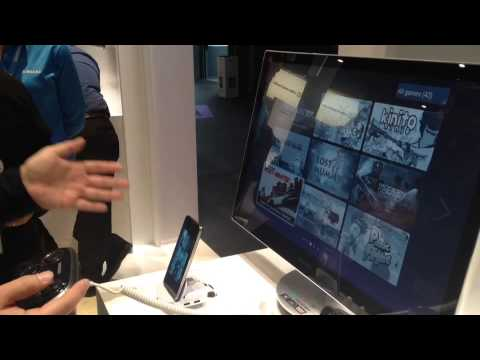
Samsung GamePad and multi-screen gaming demonstration at MWC 2014
Key insights
6 takeaways- 01Samsung is developing a multi-screen gaming platform that uses Smart TVs as the primary display and up to four mobile devices as controllers connected via Wi-Fi.
- 02The S Console is a Bluetooth-enabled hardware controller featuring dual directional pads, an analog stick, and shoulder buttons designed to bridge mobile and console-style gaming.
- 03The S Console service acts as a centralized hub for game management, supporting approximately 40 titles at launch, including major franchises like Asphalt, Dead Space, and Dead Trigger.
- 04Users can transition mobile gameplay to a television screen by pairing the S Console with a smartphone, a multimedia dock, and an HDMI connection.
- 05While the controller uses the HID profile for potential broad Android compatibility, Samsung is officially optimizing the hardware for its own device ecosystem.
- 06The S Console is currently available in Germany, with a phased rollout planned for Spain, the United Kingdom, France, and Italy.
Ask AI about this video
Transcript
okay so we're here on the Samsung look at some games so um what's your name sir uh my name is joh k I'm a senior soft engineer in Samsung Electronics fantastic and what have we got here you've got like a few cool cool tricks here you've got I'm working on the multis screen game platform the multiscreen game game platform provide the platform to make games multiscreen games multis screen games will utilize many devices to play one game okay now one the TV side we running a game binary and on the mobile side we also running the mobile game binary okay and those two game binaries that communicating through Wi-Fi network so is that is that an app that's been downloaded onto Smart TV there or yeah yeah the game is running the smart TV itself Smart TV game there two the gamees there and it's all connected okay and you can have up to four people playing using the yes for now that's because of the areny yeah okay but potentially could but they can be increased depend on the situation and is this is this um is this live now or is this kind of a coming soon uh it's in the alha stage the beta version We Come Out near
excellent fantastic okay and you've also got oh it's been taken away from us there but you've also kind of got um uh controllers here the uh s console s console yes s console is a Samsung Service suppos Samsung smartone game pad here the game pad yes this game pad will be used to control the games is called in your smart device cool can you tell us a bit about the game pad it's it's quite a big solid piece of Kit is it got four control is that four separate directional pads yeah uh one uh two directional PAAD and one analog stick okay fantastic and then two shoulder buttons and then four game buttons and how how does this work is it kind of like a Bluetooth connection or it is a Bluetooth it connect to your it will be connected to your p through the Bluetooth yeah and that you can even use this in this sty you can use it in a holder like that so so it can work with the TV which we kind of looked at earlier you can control on your smart TV yeah in this case your pH is connected to the TV through the HDMI cable okay so that's so that's connect to the TV there yes through the HDMI cable can we just
yeah I'm sure see that working quickly just somebody called it off it was working that's all right technology I know I know it's like is that going to come along all right thinking about it yeah got the whole thing okay normally when you just connect your P to the TV it shows the Android home screen yeah yeah and once you click the break here yeah it will leun to the as conso service okay fantastic as cons service will show the games installed on your device okay and these a specific uh game pad SC whole game uh we have almost 40 games supporting the game pad for now but the number will increase so some big games there there asphal and the dead space and Dead Trigger and yes so you can just see the games with the col screenshots here it means that is it's already been installed in your device okay but other ones you can install them a great let C the great screenshots it will connect you to the Samsung App Store okay page and you start the game with this but and Rel launch the game automatically fantastic okay playing is very convenient when you play when you want to play another game after playing
one game yeah let's say that you're playing one game and after you want to play another game and to play your game fantastic and it comes back okay cool that's EAS and if you've not got if you've not got your TV connected youve got obviously the phone slots in on these devices then you can just connect this to the TV through the HDMI cable MH cable sure sure but multim is better because it provide the separate power yeah so you can play game forever so is this is this dock is that like a special dock here no it's just multimedia you can buy from the retail store yeah yeah yeah and as I say this is a this comes out of here how does that work oh show me okay there m that connects together yeah you can just uh and and then you've got yeah yeah you can just Mount Your from that's cool to do game path in this way so if it's p almost all smartphones that Samsung has sure uh definitely does not be P the Galaxy tab or something like that sure sure sure so with this to you can use your smartphone as a handheld gaming device sure and it's is it is it all
Android devices obviously Samsung you promote yourself other Android devices or just Samsung devices basically it support it follows the uh HD profile so it should be compatible with Android devices however we have some special case right play yeah it only works with Samsung devices Samsung devices yeah so it's potentially Works other devices but Samsung but you don't guarantee that's not your business you're so PLS okay this is really cool so thank you very much and this is available now already though yes we are selling it in Germany and we're going to soon sell it in Spain UK and France Italy soon
Summary
Samsung Electronics is expanding its footprint in the mobile gaming ecosystem through the development of a multi-screen gaming platform and the introduction of the S Console game controller. The multi-screen platform enables a Smart TV to function as the primary display while multiple mobile devices act as individual controllers, communicating via a Wi-Fi network. Currently in the alpha stage, this technology supports up to four concurrent players, with the potential for further scalability depending on future development requirements.
The S Console serves as a dedicated hardware controller designed to enhance the mobile gaming experience. Featuring a robust build with dual directional pads, an analog stick, shoulder buttons, and standard action buttons, the device connects to smartphones via Bluetooth. When paired with a multimedia dock and an HDMI connection, the system allows users to transition mobile gameplay to a television screen. The S Console service automatically aggregates compatible titles, providing a centralized hub for users to launch games and access the Samsung App Store for additional downloads. At the time of the demonstration, approximately 40 titles supported the controller, including major franchises such as Asphalt, Dead Space, and Dead Trigger.
While the S Console follows the HID profile and may offer broad compatibility with various Android devices, Samsung officially optimizes the experience for its own hardware ecosystem. The controller is currently available in Germany, with plans for a phased rollout across Spain, the United Kingdom, France, and Italy. This strategy reflects a broader effort to bridge the gap between mobile portability and the immersive nature of console-style gaming, leveraging existing smartphone hardware to drive engagement on larger home displays.








Comments