1 free read left. Create a free account for unlimited reading + AI research.
Create free account
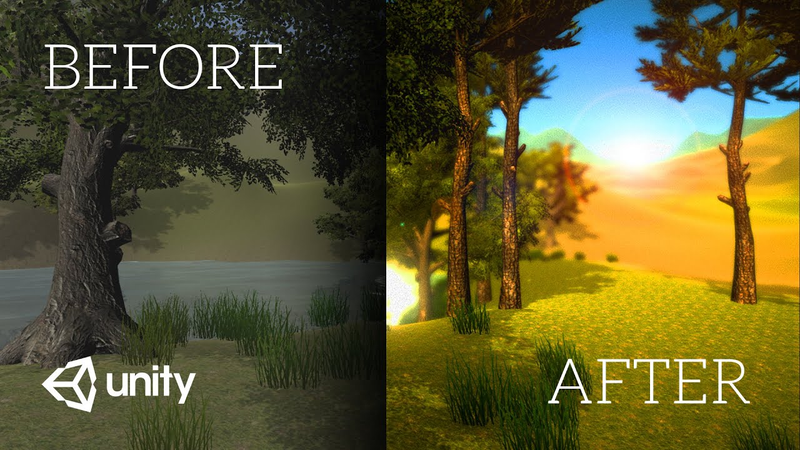
Your game 100x prettier in 10 seconds (Unity Image Effects Tutorial)
Key insights
6 takeaways- 01Post-processing should be utilized as a layer of final polish rather than a substitute for foundational art quality.
- 02The Unity Post-Processing Stack allows developers to rapidly enhance visual fidelity and cinematic quality without requiring extensive manual asset adjustments.
- 03Key technical effects include ambient occlusion for edge shadows, bloom for high-dynamic-range lighting, and color grading for precise atmospheric control.
- 04Tools such as depth of field and anti-aliasing are used to focus player attention and smooth out pixelated edges, respectively.
- 05Performance management is essential, as intensive post-processing can cause significant frame rate drops, particularly on console hardware.
- 06Strategic use of post-processing is a critical factor in the success of game pitches, crowdfunding campaigns, and overall player reception.
Ask AI about this video
Transcript
hey there thank you for clicking that thumbnail that was really kind of you my name is Thomas brush from the creator of a game called pinstripe in a game called once upon a coma both games are on pretty much every platform you can think of including Nintendo switch Xbox ps4 steam whatever coma is coming out in a month guys so click below to wish list also support on patreon if you want it would really mean a lot to me what if I told you guys there was a magic wand that could make your game look a hundred times better in like 10 seconds well it's real it actually exists it is literally as simple as waving waving a wand let's go ahead and jump into unity and I want to show you how to do it [Music] before we talk about this amazing little secret you can do for your game to make it look amazing I want to talk about an amazing company we're gonna talk about our sponsor Nora EPN they really are an
incredible VPN service they do a ton of amazing things they have a great deal for you guys but I think the most important thing is this is you this is the evils of the internet people who want to steal your content steal your data and this is just the internet and this is Nord vp8 did that make sense Nord VPNs Nord VPN wants to protect you they can protect you from people who want to steal you and all of your stuff that you're putting on the Internet also they do some pretty cool things including super fast servers you can unlock Netflix in your favorite entertainment website 30-day money-back guarantee you can protect data while travelling in public and that's airports and coffee shops cyber security no data logging 24/7 customer support even worse in China up to six simultaneous connections and double data encryption you can't beat that or can you I think they just did oh wow seventy percent off 70 freaking percent
off of Nord VPN that's really cheap is that right yeah 349 a month oh and you get a free month using my name this guy thomas brush click the link in the description get a good deal I mean that you really can't beat that thanks Nord VPNs alright so if you take a look at our little scene here there's not a whole lot going on that's exciting it's pretty bland just a really quick scene we threw together so let me show you how you can make this look in infinite times better than it does really quickly so the first thing you're going to want to do is go to the asset store and type in the search box post-processing so let's just import the post-processing stack and it's free so you'll need to download it first and then you'll import it let's just import every single thing here alright guys all of the
post-processing effects were imported into our project file so really quick it doesn't take long what we're gonna do is for the first thing we're gonna do is create a new post-processing profile and basically what a post-processing profile is is it's going to tell our camera what kind of post-processing effects we want to use for this particular scene so let's name our profile what this scene is so let's do forest level something like that so right away you can see that the post-processing profile was created and it includes all of these different image effects and these are effects that are going to be put on your camera a really good way to think about this is it's basically like an Instagram filter and you can filter all of the imperfections out of your image just like you do with your selfies and so here are all of our effects before we can actually get them to work on our camera we need to go to our camera so in this case our camera is actually on our firstpersoncharacter we're going to add
a post-processing behavior so now all we do is drag which profile we want to use into this camera so if we had 10 different profiles we could actually drag and drop them on different cameras in different levels and then if you wanted to change the post-processing image effects if you wanted to change that Instagram filter for each one of your levels you wouldn't have to go to your levels and change them individually you would actually just change them in the profiles so let's drag this forest level profile into the post-processing behavior blah blah blah that's a lot to say let's drag that here good so nothing's happened that's okay so the first thing that's going to make your game look super professional is ambient occlusion now you can do ambient occlusion with baked lighting but I prefer to do it with just the mixed real-time lighting especially when I'm in development because baked lighting takes a long time to actually bake so we're just gonna put that on really quickly and so you can see what it did
see how it's adding shadows below the grass it's also adding shadows to any edge or vertice for our polygons in our 3d models so it adds a realistic shadow to pretty much every edge in your 3d model and it does it real time it's not really hurting the CPU or the GPU so that's pretty cool and we can adjust the intensity if we want but I think it looks good right about there let's also put on some motion blur motion blur is really gonna make your game look cinematic and you can do this for 2d games you can put do it for 3d games see if I move the camera like this there's a bit of a blur it's really cool let me show you what it looks like without so let's do this really quick shake the camera like that and then if I turn it off count looks like an n64 game doesn't it kind of like we're playing James Bond so just adding a little bit of motion blur makes your game feel
modern and professional alright the next thing I love to add is just a tiny little bit of bloom so if we turn our bloom on and what we're gonna do is increase the intensity just so you can see what it looks like here so you can see the water is now shining in that beautiful and you can see even some Sun over in the horizon is peaking through those mountains now if you want to you can actually increase change the threshold so that it's really bright if we hit play here you can see it's almost like we're in a dream world so if any of you have ever wondered how games make this effect happen how they make things look dreamy it's just by adding some bloom so I don't know let's say this game is kind of like a dream world I think this looks kind of pretty so let's hit play and see how everything looks so far pretty cool things are looking a little bit better my favorite one is the color grading this is where it's gonna get really filmic and make the game look really special so let's turn that on and
then we're gonna what we're gonna do is we're gonna go to filmic so you can see the filmic look has added a lot of contrast to our image it looks kind of cool but it's a little bit dark so I'm gonna turn filmic off if it looks good for you then go for it but I'm gonna do none here what I'm going to do is actually increase the temperature just a bit warm it up and then hit you with a little bit of contrast just like that I think what I want to do is bring the blue down just a little so that makes the sky look kind of teal see that so here's what it looks like with it off and here's what it looks like on so as you can see it's kind of like adding an Instagram filter to your game like I said before so far it looks pretty cool I kind of like it so let's exit play mode and let's also do a little bit of a vignette and this is just gonna add a little bit of darkness around the frame and make it look a little bit moodier there we go and you'll see a lot of games do this
whether it's a 2d game or a 3d game to add a little bit of a vignette to make things look a little more cinematic so far looks pretty cool and another one we can do that makes me really excited is the grain here you can turn the grain on and what the grain does is it makes it look like it's a film so you can decrease the intensity and I don't like the color grain that makes it look like it's a VHS so we'll turn off color so it looks more like an old-school film and you probably can't see it in the actual video so let's increase it to about this you guys get the idea of what it looks like so that's pretty interesting right adding some grain to your image and obviously guys this is just to show you what it looks like but you can be really subtle with a lot of these details here so let's bring that down just a bit here we go and there's a couple more that actually really help your game that I'll briefly go over but
I don't typically use them anti-aliasing you can turn that on and it basically makes the edges not so pixelated so you can definitely see it in the trees there so that's a little bit of smoothing to the edges of all of your polygons and your billboard pngs I'm gonna keep that off though another one you can do is depth of field you can actually add some blur to the distance there we go so it makes things look a lot more Moody and dramatic so you can see it's blurry in the background here and really crisp in the foreground and this is again gonna make your game look very dreamy very indie I think is a good word a lot of indie games do this kind of effect so you can see is really blurry or guys you know if you were playing a first-person shooter and you were aiming down the barrel of the gun you could actually use some depth of field as well so one final note I want to say about these
post-processing effects in my experience and I've got two games on Nintendo switch now and Xbox and ps4 in my experience consoles differ in terms of performance when you have these post-processing effects on so ps4 and Xbox we didn't really see a framerate drop when we use these kinds of effects on once upon a coma but we definitely did see a drop from like 60 frames per second to like 30 frames per second when we used certain image effects certain things like noise for example I don't know why but they they slowed our game down and also the bloom and vignette hurt performance as well so just be really careful with these image effects don't rely on them if your game looks like complete garbage without them I would consider trying to fix your game first before adding on this polish
alright guys what did you think pretty cool right it's amazing what you can accomplish in 10 seconds inside of you I know it was in 10 seconds I was like 15 minutes whatever 15 minutes inside of unity you can make your game look a thousand times better make it look more professional this could be the difference in pitching your game to a publisher or it could be the difference in pitching your game on Kickstarter or just getting good reviews on Steam adding that little bit of polish makes a world of difference if you guys enjoyed this video please subscribe leave a comment trying to answer as best as I can also hit the notification bell also finally you can get your name in the credits of this video or the next video if you support on patreon get a free copy of pin stripe which is a game that I made you can see all sorts of cool behind-the-scenes footage for the games that I'm making there's a ton of goodies on patreon so please click the link in the description also guys don't forget about Nordic VPN and then the reason that I made this video or there one of the reasons I made this video so click below if you want to get a super good deal with Nord VPN
[Music] you
Summary
The implementation of post-processing effects serves as a highly effective method for enhancing the visual fidelity and professional aesthetic of video games developed within the Unity engine. By utilizing the Unity Post-Processing Stack, developers can apply a suite of image filters that function similarly to photographic or social media filters, allowing for rapid improvements to lighting, atmosphere, and cinematic quality without requiring extensive manual asset adjustments.
Key technical components for achieving this visual polish include ambient occlusion, which adds realistic shadows to geometry edges; motion blur, which contributes to a modern, cinematic feel; and bloom, which creates dreamy, high-dynamic-range lighting effects. Additionally, color grading allows for precise control over temperature, contrast, and color balance, while vignettes and film grain can be used to establish specific moods. Depth of field and anti-aliasing are further tools that help focus player attention and smooth out pixelated edges, respectively.
While these effects significantly elevate the presentation of a project, performance considerations remain critical. The application of intensive post-processing can lead to notable frame rate drops, particularly on console hardware. Developers are advised to use these tools as a layer of final polish rather than a substitute for foundational art quality. Ultimately, the strategic use of these effects can be a deciding factor in the success of game pitches, crowdfunding campaigns, and overall player reception, provided that the performance cost is carefully managed during the development lifecycle.

















Comments