1 free read left. Create a free account for unlimited reading + AI research.
Create free account
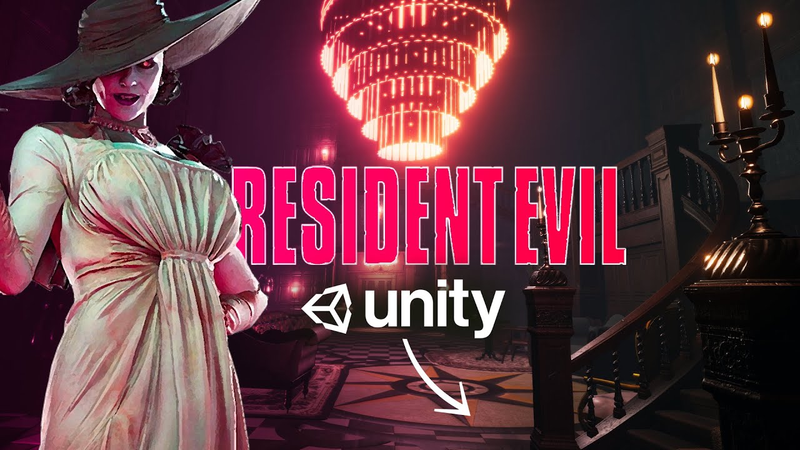
I suck at 3D and REMADE Resident Evil 8 Village... (IN ABOUT A WEEK)
Key insights
7 takeaways- 01Modular asset packs and rapid prototyping allow indie developers to recreate high-fidelity AAA-style environments, such as Resident Evil Village, within a one-week development window.
- 02While modular asset usage is effective for high-quality prototyping, it is not necessarily the most efficient strategy for large-scale, long-term production.
- 03Strategic 'asset flipping' is a viable production technique when developers treat game environments like film sets, prioritizing composition and visual consistency over individual prop creation.
- 04Converting SVG files into meshes via Blender prevents pixelation and maintains visual quality when integrating custom textures or UI elements into 3D spaces.
- 05Atmospheric fidelity in 3D environments is driven primarily by lighting, sound design, and volumetric fog rather than the creation of unique, custom-built assets.
- 06Technical implementation of volumetric effects like Aura 2 can establish depth and mood, though developers must manage the associated performance overheads and potential Z-fighting issues.
- 07Sound design techniques, such as applying low-pass filters to ambient wind audio, are essential for simulating realistic interior acoustics in modular environments.
Ask AI about this video
Transcript
The room looks very similar to the original game. We got a nice looking fog sort of shrouding the whole room. Beautiful. Thomas, you look great. Hey guys, how's it going? My name is Thomas Brush and I make indie games for a living. This past week, I saw Resident Evil Maiden like a lot of you and I was just super impressed and I wanted to see if I don't know why I thought this. I wanted to see if I could try and recreate it. And for those of you who have been following me, you know I focus on 2D games. So 3D is not really my forte, but I figured, you know, I'm going to go for it. I'm going to try it and see if I can remake a couple rooms from Resident Evil Maiden. So, let's jump into Unity. And I want to see if you guys think I accomplished my goal. Starting out, you know, I thought maybe I could try and use some of my rudimentary modeling skills inside of Blender and recreate, you know, the staircase and the couches and the plants and the doors and all of these Victorian assets. And then I just looked on the Unity asset store and lo and behold, there was already a Victorian asset pack and it was super cheap. So I downloaded that and I really quickly just started
laying things out and was impressed by how quickly you can create the Resident Evil feeling with just a few assets like Victorian walls, some floors, a couch, maybe some pictures. And this is the most important thing, and you'll see this as we discuss how I made this game. The most important thing was just really dim lighting with some pops of candle light that can make the whole game look beautiful. So, I assume that working for a AAA studio, especially in the past when hardware wasn't as good as it is now, you really had to be careful creating all of your assets and you had to create the the entire room in a program like Maya or Blender. Well, in my case, we just used modular assets. So, I just copied and pasted a ton of wall panels, a ton of floor panels, and ceiling panels. And as long as you mark those as static in Unity, you could kind of get away with all of these various pieces, ultimately turning into thousands of assets inside of Unity. So, obviously, this is not the most efficient way to
remake Resident Evil, but in my case, I'm creating a little demo here, and so it worked just fine. Now, believe it or not, one of the hardest things to recreate was the flooring. So, first off, I had to change out the wood flooring that came by default with the asset pack. And I actually just opened up that texture and the normal map inside of Photoshop and changed it into a tile floor. That was really cool. Suddenly, I realized I can change a lot of the textures with this asset pack and make it look more like my own version of this game as opposed to just an asset flip game. Now, I didn't go and change all of the textures, but this definitely was a mental note that I wanted to share with you all. You can download a ton of models for your games, guys, and you don't need to feel guilty about it. Here's a really good metaphor for you. If you were to make a short film and you had $2,000 to spend, and let's say you needed to film in a haunted house, right? What would you do? Would you build a haunted house from scratch? Build a couch from scratch? Would you
hire a seamstress, a carpenter? No. You'd you'd rent a place out and then try and light it and make it look like your own. That's what you should be doing, guys, as indie game developers when you're creating a game. Now, I get it. A lot of you are afraid of being labeled an asset flipper, and I know I am as well. But that's just the nature of the industry. Obviously, you want to try and make it look like your own. Maybe change the textures out, change some of the modeling, but just remember, you don't need to feel afraid or guilty about asset flipping. Okay? There are a lot of indie games out there that asset flip, and you wouldn't even know it because they did a good job flipping the assets. Now, I didn't really do any models from scratch. I did have to bend the stairs. However, I also changed out a few of the portraits on the walls. So, one of them on the above the fireplace, I actually swapped out the texture from the asset and just swapped it out with the beautiful woman with the very large hat. And then I also added myself into the game. And honestly, I changed up a
lot of the way my face looked cuz I I just wanted to look a little bit I don't know, more handsome. I know the title says I didn't use any modeling skills, but I did have to use a little bit of modeling skills here for the floor piece. And that was that giant almost compass shape that's on the floor in the demo. What I had to do here is originally I thought maybe I'll just create a giant PNG of this compass shape and then I'll just put it on a quad and slap it on the floor. All right, so that looks good. Problem was when you look at it from a distance, you see a lot of pixelation occurring on the edges and that's because I'm using a standard shader for my material and I also used the transparent effect to ensure that it wasn't an actually opaque quad, but you could see through it. This was causing a lot of weird pixelation in the distance, especially when you have post-processing effects on. So, what I ended up doing was exporting this as an SVG in Illustrator and then bringing it into Blender. And Blender is awesome. If it sees an SVG, it actually converts it into a mesh. Unbelievable. So, I was
able to take this PNG image, convert it to a mesh, bring it into Unity, and now those edges along the mesh were really clean and they weren't pixelated. Now, sometimes, guys, when you download an asset pack, it's not going to have all of the assets you need. So, you can find other assets on Turbos Squid and Sketchvab. And as long as you're following the attribution license properly, or maybe you're buying them and you want to use them without attributing the creator, that's totally fine. Just make sure you read the fine print there. I actually was able to download some knights and change the actual skeleton and bring their arms down and then take out a few elements from the models and then also make him look a little bit shinier so it looked like a suit of armor. And now it looks very similar to what you see in Maiden. I also had to do something similar with the teacups. In the demo, there's a teacup on a table and when you look at it, it actually has blood around. For this, I simply purchased some teacups and also a teapot and brought these into Unity. Then I was able to open up the texture on the teacup. And then I could look inside of Unity and see where various parts of the texture were
located on the model. Once I found the location, I was able to add blood around the rim of the teacup and also at the bottom of the teacup. Now, I was almost done creating this demo until I realized I wanted to create my favorite room in the demo. And that is the room with the window where you can look out and see snow, and it's this beautiful dining room, and it's really blue and dimly lit. Aside from the typewriter room in the original Resident Evil, this is probably my favorite room in any Resident Evil game. So, recreating this wasn't that hard. I just created a terrain and shifted the terrain to make it look like it was snow and created a texture for it. I also purchased some dead tree assets, put those on the land so you could look out the window and see these beautiful trees in this snowy environment. So, I figured creating this dining room scene would take maybe 30 minutes. Problem was, in the demo, the fog setting and the lighting settings inside of the living room space where the fireplace was are different than when you walk into the dining room where there's much denser fog out the window.
This is actually volutric fog. So, I downloaded an asset called Aura 2. Now, this is going to kill your performance on platforms like Nintendo Switch and mobile, but because this is a PC demo, I'm not too worried about it. So, what I did is I created one volutric fog setting for the living room area, which is very faint greens, very dim, but once you get to the window and you look outside the window, it's dense white fog. And I was also surprised to find that this just looked a lot better across the board. So, for example, if you looked at the chandelier, the fog is actually lit as well around the chandelier. So, it looks a lot more moody and a lot more realistic. Again, it's going to kill performance. So, just keep that in mind if you're going to use this asset. Now, what really makes the Resident Evil Maiden demo shine is the sound design. Now, believe it or not, for me, all I had to use was pretty much maybe five sound effects to accomplish that moody, atmospheric goal. First one was to just
download the sound of wind. I took that wind and I brought the treble way down so that all that was left was this moody bass sound. I added reverb to that and that will make the sound sound like it's coming from outside an interior place like the living room. It's important to note that for sound treble has trouble coming through the walls whereas bass you can still hear the bass. That's why if you live in an apartment, you can always hear the bassy rumble of somebody's music if, I don't know, they're having a party downstairs. So, there's no real grandfather clock ticking in the maiden demo, but I added it to my scene because I felt like it was just too beautiful not to add. And then also, I combined a few sounds like a squeaky door opening and also a latch clicking. And I added that sound to the door opening into the dining room. Finally, I created a very simple animation for walking. And inside of that animation, I used what's called animation events. And I would use those animation events to fire sound effects every time the player touches the ground as we bounce when we move. So, let's go
ahead and play my recreation of Resident Evil Maiden. And guys, I want to hear your thoughts in the comments. Did I accomplish my goal of recreating this AAA game inside of Unity? All right. So, there are certain aspects of this scene already that I don't like, but overall, I think that uh we've got the mood and the fog down. We've got the sound of the click ticking clock and the wind. Oh, there's supposed to be a door there, but this is all I had time for. So, as you can see, the room looks very similar to the original game. Um, the staircase here was just a simple staircase asset that I turned in Blender. Um, obviously it doesn't look exactly like the staircase. Definitely not as ornate, but I think overall it doesn't look too bad.
So, here is who knows, maybe the the screenshot that I would upload to Steam if I got some doors here. Beautiful portrait. [Laughter] Oh, man. Beautiful, Thomas. You look great. Thank you. So, here is our little mesh for our floors here. So, this is actually a mesh over top of the tile. And we created a normal map for it. So it looks 3D almost. Very good. We got Miss Big Big Miss Big Hat above the fireplace here. All right, let's see if I can crawl over the the table here. And we got a Oh, this fire asset. I forgot to mention this fire asset I downloaded from the Unity the Asset Store as well. And here are our
nights and shining armor just chilling. Very good. So, as you can see, we got a nice looking fog sort of shrouding the whole room. That definitely makes it feel a lot more high quality, even though really what you're doing is hiding a lot of flaws. Now, what I did notice is some Z fighting that you might find. And Z fighting is when you got two planes on top of one another and they just flicker back and forth because Unity doesn't really know what to do with them. So you can see the flickering occurring here. And that's just what happens when you rush together a demo and you use a bunch of modular assets. Right? Here's the chandelier that we decided to use. Very different from the actual maiden chandelier. But the way we made it shine, I say we. Why do I say we? It's cuz this is why it's cuz I live streamed the creation of this. A lot of you joined me and we created this together. So, this isn't actually lit with anything. There's no bulbs or candles. What I did is I put a spotlight below it and shined it up. And what it's
doing is reflecting off of all of the glass that was included in this asset. So, it looks like it's emitting light, but it's not. All right. This little picture here was pulled directly from the maiden demo. We just took a screenshot of it, pulled it into Photoshop. Pretty cool. All right, let's open up this door. [Music] All right, so here is my attempt at recreating this room. I realized after I created the room that the dimensions are kind of off, but overall, I think it definitely accomplishes the same kind of similar feeling. All right. Hey, looks like we've got a floating spoon here. Oh man. So, there are demons in this mansion, which is not surprising at all, is it? So, we've got a kind of similar room. This is definitely the room that I didn't follow as much to the tea. But here we go. We can look out the window.
And as you can see, the fog looks a little bit different obviously than the fog in this room. This is dark and uh very faint fog kind of like dust whereas out here it's a more moist snowy fog. So there you go guys. That is Resident Evil mated inside of Unity. Plenty of bugs, plenty of glitches, plenty of Z fighting here. And this is my favorite glitch. This door only opens one way. So, it's really hard to get out of it. Let's try again. Go, go, go, go, go. Oh, it hit me in the butt. Okay. All right. So, did I accomplish my goal of recreating Resident Evil Mated in Unity? Let me know in the comments below. And guys, be sure to subscribe if you're not already. And also, click the like button. That would really mean a lot to me. I'll talk to you later.
Summary
This project demonstrates the feasibility of recreating high-fidelity environments from AAA titles like Resident Evil Village using modular assets and rapid prototyping techniques within the Unity engine. The primary objective was to replicate the atmospheric mood and visual aesthetic of the Resident Evil Maiden demo within a one-week timeframe, despite the developer’s primary background in 2D game design. The project serves as a practical case study for indie developers on how to leverage existing asset stores and creative lighting to achieve professional-grade results without building every component from scratch.
The methodology relied heavily on modular asset packs for architecture and furniture, supplemented by custom texture modifications in Photoshop to ensure visual consistency. Key technical solutions included using Blender to convert SVG files into meshes to avoid pixelation, implementing volumetric fog (Aura 2) to establish depth and mood, and utilizing specific sound design techniques—such as low-pass filtering wind audio—to simulate interior acoustics. The developer emphasizes that "asset flipping" is a viable industry practice when executed with care, suggesting that developers should treat game environments like film sets, focusing on lighting and composition rather than building every individual prop.
The final demo successfully captured the intended atmosphere, though it highlighted common pitfalls of rapid development, such as Z-fighting, collision issues, and performance overheads associated with high-end volumetric effects. Ultimately, the project concludes that while modular asset usage is not the most efficient path for large-scale production, it is an effective strategy for indie developers to create immersive, high-quality prototypes. The results underscore that lighting, sound design, and atmospheric fog are the most critical factors in establishing a cohesive, professional aesthetic in 3D game environments.


















Comments