1 free read left. Create a free account for unlimited reading + AI research.
Create free account
ANYONE Can Illustrate 2D Games (Making Crappy Games Look Good)
Key insights
7 takeaways- 01Create depth and focus by desaturating background elements while increasing contrast and saturation for foreground objects.
- 02Unify disparate art assets by applying color overlays across layers and using selective blurring to simulate depth-of-field.
- 03Transform technical limitations into deliberate design choices by utilizing textures to define a specific, intentional art style.
- 04Apply post-processing adjustments such as brightness, contrast, and vignettes to provide a cinematic finish to 2D environments.
- 05Enhance the perceived production value of a scene by adding UI elements like health bars, title text, or cinematic letterboxing.
- 06Professional visual polish is achievable for non-artists by prioritizing color theory, lighting, and post-processing over complex illustration skills.
- 07Establish a cohesive aesthetic by using a limited color palette and applying complementary colors to generate visual interest.
Ask AI about this video
Transcript
oh sorry I'm getting over a cold hey guys my name is Thomas brush am the creator of a game called pin stripe and also finishing up a game called once upon a coma if you want to take a look at those games they're pretty much available on every platform so click the link in the description see if their games you might be interested in alright so today I want to take a terrible illustration probably the worst one you'll ever see maybe I don't know and then we're gonna take the terrible illustration and we're gonna make it beautiful only by changing the color in the lighting see color is incredibly important it's actually I think one of the most important parts of your game sound and color in my opinion are the most important part of at least the aesthetic of your game how it feels that polished look so let's jump into Photoshop and I want to show you how we're gonna take a terrible illustration and make it beautiful number before we get started guys this video is sponsored by raid Shadow legends raid is the sensation of the mobile world at 10
million mentions in just a few months and 15 million downloads in the last six months now what's cool is you can have 400 champions that you can personally customize and the coolest part is is that this is all free you can simply download on your mobile device and there's gonna be some extra cool features in this game for example multi battle Auto mode where you can simply set the game to play automatically in the background so that you don't have to play overnight there's also weekly tournaments and events and there's also a road map that the developers have published where they're gonna have huge plans and updates for the game [Music] for example new faction mode tag team arena feature and there's also a new clan boss mode where you can fight your own clan mates now by the way guys my in-game nickname is thomas brush 90 so if this game sounds like something for you click the link in the description get fifty thousand silver and a free epic champion as part of the new player program what have you got to lose click
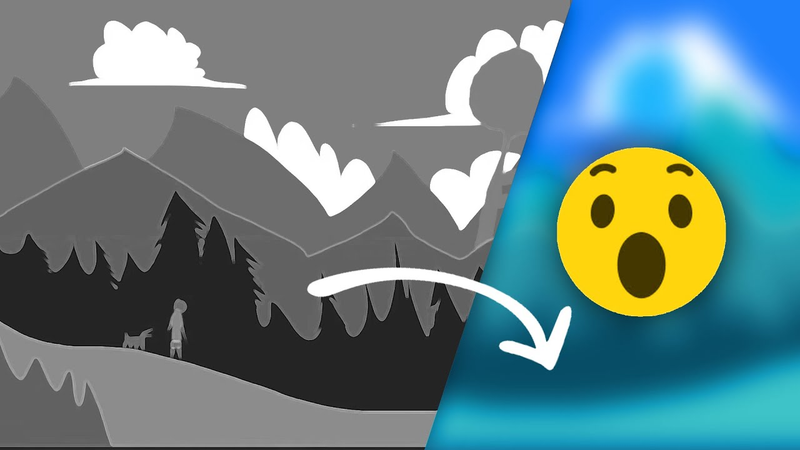
the link in the description and check out raid alright so the first thing we're gonna do is create a document 1920 by 1080 and I'm just going to use you know terrible logic here terrible illustration skills and just create an illustration like a would if I was five years old mountains are green right so we're gonna create some mountains we're gonna create some clouds that look kind of like something from Wind Waker here and clouds are white okay so far so good not really but let's keep going more Mountains I guess they look similar to the mountains behind them but let's maybe shift the color a little bit so they don't blend into the mountains so I guess that's fine not really but we're gonna keep going and we're gonna create some trees here nothing super spectacular again using just bad illustration techniques to create some trees and this is a huge problem that a lot of new illustrators
have which is the add detail to elements on the same layer but other details or the details aren't consistent I guess so we have some details but not enough so think makes things look kind of strange but we're gonna move forward here let's create some ground using the lasso tool and again guys we're using if you don't know we're using the lasso tool here to fill in various shapes so added some foreground elements and we're gonna create a character now maybe add a dog I think he looks okay not really but we're gonna move forward the face or the shirt we can maybe fill in let's just choose a random color and I know guys a lot of these colors are random because frankly if you're starting games you're gonna feel like you're filling in random colors because a lot of us myself included we don't really know what things are gonna look like so we just choose random colors and hope for
the best so this is how things look when you're just random and you have terrible illustration skills this is not good I want to stress this looks terrible as you can see when we zoom out it does not look realistic at all it looks terrible when you zoom out you should have a sense that it has some kind of realism because it blurs and it looks a little bit more realistic so we're gonna create a new document here and we're gonna call it a color palette document as you can see I don't know how to spell color palette so I'm gonna pretend that I know how to spell it but I'm gonna make it look terrible let's call this the bro and sis colors in our color palette so we're gonna create two subcategories bro and sis colors and then cousins color the bro and sis colors are two colors that are opposite one another and these are colors we're gonna use in our document so we're gonna choose an orangish red and then also eight a lush green I really like these two colors and I use these colors a lot as you can see
they're basically opposites and this one down here this cousin color it's actually just a color that is similar it's kind of a pastel maybe a greenish color that looks kind of cool so the cousin color we're not gonna use a lot now as you can see here I'm actually now desaturating one of the colors and I like to desaturate it the blue and I'll show you why in a second and we're shifting that red just a little bit so we're desaturating one and keeping one very vibrant I'm gonna paste in this rasterized image flattened image of the color palette and what we're gonna do is we're gonna take that greyish blue and we're gonna apply it to every single layer using the color overlay effect and we're just gonna duplicate that color onto every single layer minus the player in the rocks because we'll be doing different colors for those so this bluish color is actually gonna be this atmospheric color we use for every single layer to sort of wrap everything in a realistic gloomy
color now what I'm doing is I'm actually splitting that color in half and I'm gonna make a the right side a more saturated more colorful and darker blue so it's got the same hue but it's just darker and more saturated and again saturation means more color it's not as grey now what I'm gonna do here is just rasterize every single layer commit all of those color overlays we're not gonna need to change anything about those color overlays so let's just go ahead and rasterize them so it makes things a lot simpler now what I'm gonna do is do it another color overlay but we're gonna paste in this new color pallet with the darker blue on the right side there and what we're gonna do is we're gonna take that darker blue and as things come closer and closer towards the camera we're gonna add in more and more of that darker blue the reason why guys this is this is just simple logic about the real world as things get further from the camera they get grayer because of
atmosphere and fog or smog or mist that's just the way the world works so we're making things more vibrant and also darker as they get closer and closer towards the camera so as you can see we have a lot of depth that was created just by adding in that darker blue as things get closer to the camera we're also gonna decrease that clouds a little bit and now we're gonna use that vibrant red color to allow things to have a pop when you have a poor illustration I find that adding a pop of color on top of some grayish tones really makes things look professional and really unique and kind of trendy so we can add in this colorful pop of orange to the dog and and our character here and now things are looking a lot more stylized and a lot more trendy I also like to add a little bit of a bloom a glow when we have areas of high saturation it almost makes it look like there's fog and mist in the scene I'm also adding in a couple
flowers here because I want to show you how we can use that cousin color so you have a little bit of green here but I don't really like it so we're just gonna go with red it depends on what you want to do you can use that cousin color if you want now you can also add in some texture from a website called pixels comm PE X Els and right now we've added in a cardboard looking texture which I really think makes things look more childish and really we lean into that childish look believe it or not leaning into a weakness you have is actually a good idea because it makes things look intentional it makes you look self aware so we're gonna add in some inner shadows now to all of our layers to make things look a little bit more three-dimensional and make it look like lighting is coming from the top left hand corner now believe it or not adding in some drop shadow could actually make your scene look like it's a cardboard cutout scene almost like Yoshi's Island this in the end I'm gonna sort of abandon but I kind
of wanted to show you that you can add in drop shadow to your scene to make it look more cartoony and then what we're gonna do is on top of every single layer at the very top we're gonna use a brightness contrast adjustment so you can see here we've added in some contrast because things weren't looking contrasting enough so this is a kind of an industry standard thing to do guys just adding in some post-processing like brightness or contrast to make things look more filmic now what we can do is also add some blur and motion blur to things so we added motion blur to the clouds to make them feel like they're being sort of streamed across the sky and then we're adding in blur so things are blurrier the further away from the camera they are so you can see we're adding blur to a lot of blur to the mountains in the background and then slowly adding less and less blur now there's also gonna be a lot of blur and foreground elements and you can look at games like hollow Knight that do this really well and this is gonna make things look more stylized more interesting and also allow us to focus on the player and then here I'm just using some lighting techniques to add in
a little bit of drop shadow or shadow from the trees and it's actually being cast in the wrong direction but overall I think it looks pretty decent I'm also gonna add a subtle vignette at the top to make it look like the sky has a gradient in a sunset feel I'm gonna shrink the size of this water tower and then one of my favorite things to do after I'm done is actually shift the colors a little bit so what we're gonna do is shift more towards the blue side but we're gonna add a gradient to it a gradient mask so it starts green at the top and as it goes towards the bottom its blueish this is kind of how the world works things the the horizon is a different color than when you look straight up into the sky especially a evening then I'm gonna add an inverted mask and then go a little bit more towards the red so the top of the image is red and now we're gonna add in some birds and you'll notice that adding in subtle details like the title some UI elements will
really make your your image pop it'll make you excited about your game and also this is a great way to pitch your game on social media and also when you're sending emails out to publishers adding the title add in a press start icon maybe even add in some UI elements like hearts or in this case I really like adding cinematic bars even though a lot of games don't have cinematic bars this makes your game look really professional I don't even know why but adding in the intentionality of cinematic bars and even some hearts here and we're gonna use that same vibrant orange color to make me hearts pop you'll notice that adding these elements make things look way more professional then if they definitely look way more professional than they started out and we're gonna add in some text here and overall guys this is how it can look a terrible looking illustration turned into something that's manageable and
slightly professional so what you guys think it's pretty simple once you get the hang of the principles of color to make something that looks terrible look halfway decent if you guys enjoyed this video if you thought it was interesting or helpful please hit the subscribe button hit the notification bell hit the like icon leave a comment do all those cool things and also remember you can support me on patreon get a free copy of pin stripe which was my first commercial release and as always guys - thank you so much I'll talk to you later bye [Music] you
Summary
This analysis outlines a methodology for improving the aesthetic quality of 2D game illustrations, specifically targeting developers with limited artistic experience. The core thesis posits that professional-grade visual polish is achievable through the strategic application of color theory, lighting, and post-processing techniques, rather than relying solely on advanced drawing skills. By embracing a stylized or "childish" aesthetic and applying intentional design principles, developers can transform rudimentary assets into cohesive, professional-looking game environments.
The process centers on establishing a limited color palette, utilizing complementary colors to create visual interest. Key technical steps include applying atmospheric perspective by desaturating background elements to simulate depth, while increasing saturation and contrast for foreground objects to draw the player’s focus. The methodology emphasizes the use of color overlays to unify disparate layers, the application of depth-of-field effects through selective blurring, and the implementation of post-processing adjustments such as brightness, contrast, and vignettes to achieve a cinematic feel.
Furthermore, the analysis highlights the importance of intentionality in design. Adding UI elements—such as health bars, title text, or cinematic letterboxing—can significantly elevate the perceived quality of a scene. The approach also encourages developers to lean into their limitations, such as using textures to embrace a specific art style, which transforms potential weaknesses into deliberate design choices. These techniques, commonly observed in professional titles, provide a framework for independent developers to enhance the visual appeal of their games, improve their marketing materials, and create a more immersive player experience without requiring high-level illustration expertise.













Comments