1 free read left. Create a free account for unlimited reading + AI research.
Create free accountMore New Features! - MATCH STATS - (Epic Feedback!?!)
Key insights
6 takeaways- 01Integrating post-match statistical analysis and real-time progress tracking allows players to diagnose tactical failures and evaluate the efficacy of specific unit management techniques.
- 02Visualizing enemy depletion rates and remaining spawner counts counters the feeling of stagnation by providing clear evidence of progress against enemy forces.
- 03In-game progress bars and percentage indicators provide immediate context for a player's standing relative to level completion requirements, maintaining a sense of flow.
- 04Balancing high-density post-match analytical graphs with clean, real-time interface indicators is essential for sustaining user engagement.
- 05Future UI development should prioritize adding metrics like real-time population counts only if they can be integrated without overwhelming the player interface.
- 06Effective feedback mechanisms transform disconnected gameplay actions into a measurable, iterative process of strategic refinement.
Ask AI about this video
Transcript
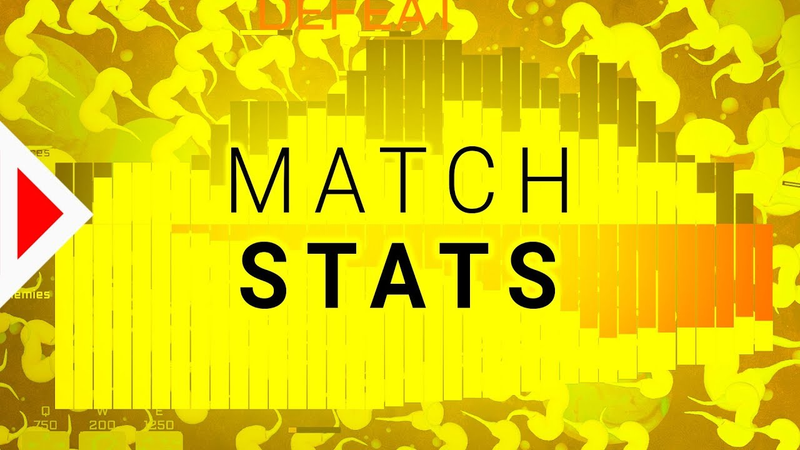
[Music] hey everybody this is Jonas developing video games with you and today I want to make a really cool change to all of us know what our cool little strategy game I want to add an end screen and I wanted to have statistics on it so this basically the victory or defeat screen or whatever that pops up whenever you win or lose a match let's press e that instantly duplicates all units and I hope you can see that on the final graph some bars on the top which are split in two parts and then I want you to be able to compare that with the amount of enemies or more with the total enemy HP so blue bars blue creatures white bars X orange bars enemies we could also do something like this as a line on top of that but for now I
think I'll I'll try to do this first so okay you're here once again you can see my population was constantly growing then here's where the big spike is that's when I press the e ability instantly doubled my population that once again that shows how powerful this ability is it's absolutely crazy and then here after this white eggs hatch you can see blue goes up once again but also a lot of creatures leave the room that's why it doesn't go up all that much I that all looks really funny because I didn't really hurt the boss all that much I just grew my population and then I killed the boss at the end that's pretty much the best way to solve this level even my special abilities didn't help me there maybe we can figure out in the statistics what went wrong that's
the issue I have it doesn't really look like progress if the enemies get more and more instead of less and less what I I would much rather see an enemy curve that goes lower and lower and what I would have to do for that is just include all the enemies that are still in the spawners in this graph down here so it looks a lot more like making progress so that's what I'm gonna change next I think that will feel a lot better so I updated the graph let's play this level and I'll show you what I mean okay now you can see what I mean look usually or in the last version you only saw the red curve and that that doesn't really feel that good because they slowly spawn out of the spawner 's and enemies get more and more and if you look at that graph that doesn't really feel like you made any progress but if you look at it like this you can see that it was just constant progress you got further and further and that feels a lot better it
gives also gives you a lot more information on when you dealt damage to the enemies now you can figure out a lot better what actually happens in the match so let's go to another spawner level to the hardest one and let's see how the graph looks when I play this level I need to beat it again come on I have so many new abilities it should be really easy to beat this don't come close to me I feel like I lost a lot of X there no no this is not good why am I so bad but I really like this graph it tells you a lot okay let's try this level again I want to beat it at least once I have so many new abilities and as they can't beat it come on w-w-w-whoa was just a little too hard you can clearly see that I didn't deal any damage here come on why is it so
difficult that was hard what a beautiful graph looks really solid now I'm really happy with that result but I think I can bring some some of that into the game as well so you can see how well you're doing while playing or how much progress you might okay I think this is a really cool change you can see this progress bar on the left hand side now whenever I kill an enemy the progress bar goes up and also this percent number here goes up so you know exactly how many enemies you still need to beat then you get this beautiful feedback power at the end here I think these little changes showing you this graph at the end and also your progress during the level makes it instantly so
much more enjoyable because you just get more feedback for what you're doing for how well you're performing and I think we could add or I think we'll add a couple more of these feedback features in the future I also don't want to clutter the interface too much but I think this is this is still fine probably shouldn't add too much more stuff I would like to add a population number or something like that so you can see how many creatures you have at the moment but yeah not really sure where I could add that and if I should really do that oh okay this graph looks a little weird because I played for too long has some artifact uihlein's here in between but I think it's alright okay we're at 10% how encouraging
come on couple more but I got to 78% that's neat very nice very nice well this time I only got to 50% that's also not quite all that encouraging but at least you get a bit of feedback so I think this is actually a really cool change hope you like it as well tell me what you think in the comments do you have any ideas what we could add to these statistic bars or what we should change or what you would like to see in the game thank you very much for
watching I think the game is getting better and better step-by-step one little thing at a time have an amazing day and see you in the next one peace out
Summary
The integration of post-match statistical analysis and real-time progress tracking serves as a critical design intervention for single-player strategy games. By implementing visual data representations, such as population growth curves and enemy depletion graphs, developers can provide players with actionable feedback regarding their tactical performance. This approach ensures that players maintain a sense of flow and clarity, allowing them to diagnose strategic failures and identify the efficacy of specific abilities or unit management techniques.
A primary challenge in strategy game design is ensuring that the player perceives tangible progress, particularly when enemy spawning mechanics might otherwise create a sense of stagnation. By adjusting the data visualization to include enemies remaining within spawners, the game successfully communicates a downward trend in total enemy strength, which reinforces the player's sense of accomplishment. This visual feedback loop is further enhanced by the addition of an in-game progress bar and percentage indicator, which provide immediate context for the player’s current standing relative to the level's completion requirements.
These design iterations demonstrate that balancing information density with interface cleanliness is essential for maintaining user engagement. While detailed post-match graphs offer deep analytical value for strategy optimization, real-time indicators serve to keep the player focused on immediate objectives. Future development considerations include the potential for additional metrics, such as real-time population counts, provided they do not overwhelm the user interface. Ultimately, these feedback mechanisms transform the player experience from a series of disconnected actions into a measurable, iterative process of improvement and strategic refinement.


















Comments