1 free read left. Create a free account for unlimited reading + AI research.
Create free account
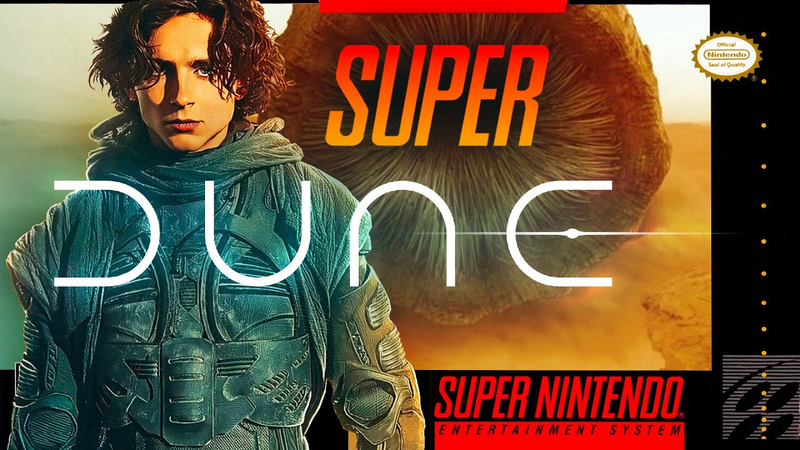
I Made DUNE Into 2D Pixel Game Art...
Key insights
7 takeaways- 01Achieving a sense of massive scale and atmospheric depth is the primary requirement for successfully translating cinematic source material into a 16-bit pixel art format.
- 02A 660-pixel wide canvas at a 16:9 aspect ratio provides an effective resolution for balancing retro aesthetics with modern cinematic composition.
- 03Iterative experimentation and strategic layering are more effective for creating complex scenes than following a rigid, pre-visualized plan.
- 04External assets, such as silhouettes from the Noun Project, can be used to quickly establish character proportions before adapting iconic elements to a side-scrolling perspective.
- 05High-fidelity pixel art can be achieved efficiently by scaling gradients down and back up to create intentional banding, rather than relying on manual, pixel-by-pixel placement.
- 06Complex dithering effects can be simulated rapidly by applying noise filters to textures, while high-contrast highlights and lowlights are essential for defining surfaces like stone and metal.
- 07Foreground elements with high detail and dark values are critical for establishing depth and enhancing the perceived scale of a 2D environment.
Ask AI about this video
Transcript
[music] If you wanted to make Dune into a Super Nintendo game, you'd really need to accomplish one main thing. And that's what the film did so well, and that is you make a game feel massive. So, I'm going to try and do that here in my Super Nintendo little remake here in Photoshop. We're going to be working with pixel art, so I've got a 660 pixel wide canvas. It's a 16 by 9 aspect ratio. And you can see that I'm choosing just a few colors, and those are at the top left-hand corner. This is my little swatch palette. I'm basically using a very light gray blue, and it's coming [music] towards the camera along the Z axis, and it's slowly becoming a dark brown. This slow gradient creates a feeling of fog, like the sandy fog you see in the film pretty much [music] the entire time. Now, don't stress out when you're making your 2D art. You don't need to worry too much about knowing exactly what everything should look like. You can see here that I'm kind of just guessing and
checking. I'm not quite sure what the heck I'm doing, but I'm just dragging things around and playing around just to get an idea because the truth is I don't really know what something looks like in my head. A lot of illustrators know exactly what their scene's going to look like. They can see it in their head. I can't, and I think a lot of you agree. You can't really see it. So, what you need to do is just test it out, drag things around just to get an idea of what things look [music] like. And this right here is the most important thing, having a small little character somewhere in your scene to get an idea of scale. I usually throw in that character about 10 minutes into my illustration. Now, I learned a really sweet trick when it comes to pixel art in 2D. What I like to do, and you can see I'm doing it here slowly, is whether it's a radial gradient or [music] a vertical or horizontal gradient, what I'll do is I'll draw the gradient. It doesn't look great in in game because it looks a little too smooth, And then I'll actually scale it down and then scale it back up. You can see I'm doing it right
here. I've created this banding effect and that's just by scaling down a gradient, scaling it back up. I also did it with a radial gradient there to create a little bit of a shine. [music] And then also just a subtle subtle gradient again creating that banding effect by scaling down these clouds and then scaling them back up. You can even warp them using the warp tool in Photoshop to create that fog rolling across the sandy hills. [music] Here's another really cool trick I learned and it's for lazy people like me in creating pixel art. I don't like to create that dithering effect with pixel art [music] using one pixel at a time. Instead you can see here I've created inner shadows on the right side and the left side, a highlight and a lowlight, and then I just created noise. [music] And that noise makes it look like I've
placed those pixels individually when in reality it's just an effect in Photoshop. Also you can see I've added just some god rays coming out of the sun behind that massive ship. And then I also decided to make it feel a little bit more like Dune we needed a sci-fi city. You see this city a lot in the film especially during the first third of the film. [music] And this is one of my little secrets I share in a lot of my videos. I'll just create a vertical gradient and then place it all over sometimes horizontal gradients as well and I'll place it all over those background hills and it makes it look like rock and stone. Just finishing up some very subtle clouds here and coming back to this layer creating some 45° angle gradients to make it look like shadows are being cast across the landscape. All right, just finishing up the fog
here and just some subtle glows from the clouds. Just to make it feel a little bit more dusty, a little bit more glowy, and bloomy. All right, now I'm focused on the ground. And that is the ground the player can walk on. It's really important that this is detailed because you want the player to know what they can walk on. So, you always want to make it pop. So, what I'm doing here to add some detail to this ground that the player can walk on is I'm trying to figure out how to create a very simplistic pattern to make it look like there's brick. So, you can see I just duplicated one little stamp of brick [music] and then I've put it on this layer here to make it look like it's a little bit more detailed and it pops. It doesn't look as simplistic as the background. [music] Now, I'm just doing the same thing I did with the background but a little bit more detailed here. Just adding some shadows with some gradients. Also, some sci-fi looking vents. [music] If you ever want to make a something look like there's a slit or a crack, just put a highlight and a lowlight right next to each other. And I've done that throughout this entire ground layer. You can see I'm doing it right here. Dark shadows and very bright white
[music] lines right next to them to create that pop. It makes it look like highlights and lowlights. Well, I didn't really like my foreground elements. So, I just deleted those and duplicated the ground layer and brought it slowly forward making it darker and darker. And then I also covered it in this gradient. Again, scale down the gradient and then scale it back up and it looks pixelated. Now, I've mentioned this in my previous videos. Don't ever underestimate the value of foreground. [music] And the foreground in my case is going to be very dark and very detailed. Hollow Knight does this incredibly well. I've always taken it so many tips and tricks from Hollow Knight and And doing it right here. So, I'm slowly creating that foreground, making it look a little bit darker, makes things look a little bit more moody and a little bit more sci-fi. And to top off that sci-fi feel, I just created some tiny little pixels of white, created some glow, and it makes things look, well, a lot more
futuristic. Well, things looked a little bit too futuristic, so I actually decided, you know, I need to throw in something that looks broken. I'm not sure what exactly this is, and this happens a lot when I'm doing 2D art. Something is just needed, a shape is needed, and so I'll just create that shape, and I don't really need to justify exactly what it is. [music] To make things look old as well, I also created just some subtle torn cloth coming down from the top of the screen. This was accomplished by just creating a square, cutting out an oval in that square, and then just duplicating that all over the scene in various layers. [music] Of course, when you're making Super Dune, you have to It's a requirement by law, I guess, to create this sandworm. [music] This was actually the hardest part of this illustration. It was tough because the sandworm is very simplistic, but the features that make it look like a sandworm are
actually [music] facing the camera. In the film, when the sandworm is facing the camera, you see those teeth. Well, because this is a 2D platformer, I wanted to make it side view, but then we can't see the teeth. So, I took a little bit of creative liberty here and just slowly created those teeth, very subtle pixelated lines. [music] It's really hard to create angled lines with pixel art, but I feel like I did a good job here. So, we've got the sandworm in the background here. [music] [music] My son. Last, but certainly not least, we've got to create Paul. So, what I'm using here is Noun Project. I've simply downloaded a silhouette of a character and then I've basically erased the entire thing, but I kind of traced it to get a just an idea of what that silhouette looks like. This was tough. It's really, really hard creating protagonist [music] in 2D art. It's one of the hardest things you can do, so don't feel bad if you struggle with it. I still struggle with it and whether it's a vector art game or a
pixel art game, you have very limited space to work with, so you got to really make those pixels count. So, I've done my best here to create Paul holding his dagger and then of course, we want to create a main menu here cuz I love the Dune logo and I love seeing press start on my artwork. So, here we go. We've got the Dune logo in pixel form and it says press start. We've also got our UI here with obviously shield from the film and even health as well. So, that is super Dune. I'm really, really proud of this piece of art. You can see we've got the giant ship in the background, some moody fog. We've got Paul obviously. We've got this techy but archaic landscape that you can walk on. We've got the helicopters in the background or what are they called? They're like I don't know what they're called. Copters? Bug copters? I don't know. But, they're in the background as well and obviously the sandworm.
All right guys, if you liked this video, be sure to leave a like, subscribe for more videos like this. I like to do 2D remakes and also leave a comment below of maybe games you want to see or what you thought about this. I love constructive criticism. Anyways, that's all I've got for you today guys. Cheers.
Summary
The primary objective of this artistic demonstration is to translate the cinematic scale and atmosphere of the film Dune into a 2D pixel art environment reminiscent of Super Nintendo-era games. The central thesis posits that achieving a sense of massive scale and moody, atmospheric depth is the most critical factor in successfully adapting the film’s aesthetic into a limited-resolution, 16-bit format. By utilizing specific digital manipulation techniques, the process emphasizes that artists do not need a rigid, pre-visualized plan to create complex scenes, but rather should rely on iterative experimentation and strategic layering.
Key technical findings focus on efficient workflows for achieving high-fidelity pixel art without manual, pixel-by-pixel placement. Notable methods include scaling gradients down and back up to create intentional banding effects, using noise filters to simulate complex dithering, and employing high-contrast highlights and lowlights to define textures like cracked stone or metallic vents. The process also highlights the importance of foreground depth, suggesting that dark, detailed foreground elements significantly enhance the mood and perceived scale of a 2D scene.
The methodology relies on a trial-and-error approach within Adobe Photoshop, utilizing a 660-pixel wide canvas at a 16:9 aspect ratio. The workflow incorporates external assets, such as silhouettes from the Noun Project, to establish character proportions, while prioritizing creative liberty to adapt iconic elements—such as the sandworm—to a side-scrolling perspective. The final composition integrates environmental storytelling, including atmospheric fog, sci-fi architecture, and UI elements, to successfully replicate the thematic essence of the source material within a retro gaming framework.



















Comments