1 free read left. Create a free account for unlimited reading + AI research.
Create free account
My Dream Game Development Desk Setup
Key insights
6 takeaways- 01Prioritize long-term physical health by investing in height-adjustable standing desks and ergonomic seating to mitigate chronic issues like neck pain.
- 02Optimize workstation performance for AAA-style Unity development using an AMD Ryzen 7 7700X processor and 32GB of RAM.
- 03Utilize dual 32-inch 4K monitors instead of ultrawide displays to maintain a centered focal point and reduce neck strain during extended work sessions.
- 04Maintain a clean, efficient workspace through the use of wireless Logitech MX series peripherals and dedicated cable management systems.
- 05Streamline content production by integrating professional-grade hardware, specifically a Sony A7III camera, a Shure SM7B microphone, and Godox SL-60W lighting.
- 06Design the workspace as a versatile, minimalist environment that allows for seamless transitions between intensive coding tasks and high-quality video recording.
Ask AI about this video
Transcript
[Music] Hey there. Uh, my name is Thomas Brush and I make video games for a living and I also make YouTube videos about video games. Uh, today I'm thrilled to share my meticulously planned office setup as a YouTuber and as a game developer. And this took me about four to 5 months to acquire all of this stuff. I did it all in one go because frankly after 10 15 years of making games and YouTube videos with a, you know, a subpar office, I was ready to just invest. So don't feel bad if you don't have this. It does take some time. So anyway, let's talk about this desk. Uh really I have bad neck pain. I've had it for about 16 years just cuz I slouch at my desk while I make games. But I discovered the benefits of standing while I was on a mission trip in Slovakia. And my neck pain was gone. So I decided to invest in
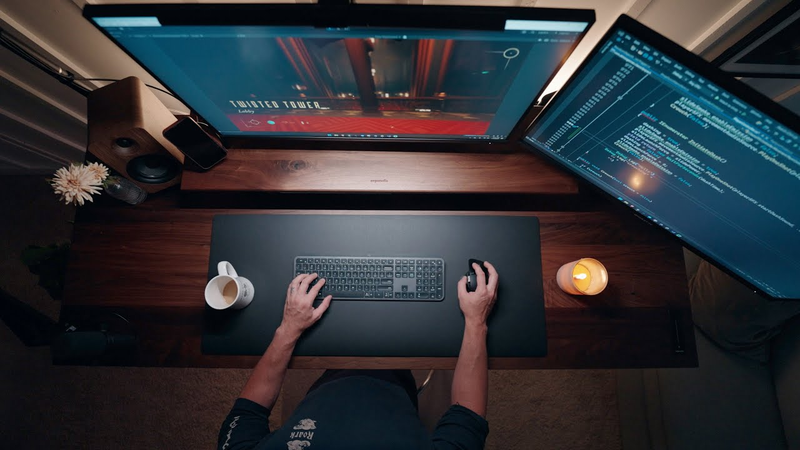
the Urggon office. It's called the Sway Standing Desk. And it's in walnut and black. And it's 30x 72 in. It not only alleviates my neck pain, but it also well it hides my YouTube studio and gaming setup wires. I can put them all underneath. And there's also a cable net as well that comes with the desk. So, I just stuffed everything underneath there, and it's all plugged into one outlet. Alongside the desk, I have the Ergonoff desk shelf for extra storage and display. This alongside the YouTube ergonomic chair in black and almond. These both ensure that I'm just comfortable during long 8 to 10 hour work days. To me, it's worth it because, well, I spend the majority of my life at this desk. And so, I'm kind of ready just to be happy and be comfortable. So, that's why I spent the money. Now, let's move on to the computer. Usually, I tell people to get subpar computers or like
just general gaming computers if they're making games because you really want to make games that are crafted towards the majority of your audience. Most of them don't have an incredibly powerful PC. However, me and my team needed to get a a higher speed PC for more double AAA style games that we're creating. Um, it's called Twisted Tower. By the way, you can click the link below. Um, this game really requires us to have something a little bit more powerful, especially in the Unity editor, which is just a lot slower than a standalone build. So, I upgraded to the AMD Ryzen 77700X8 core processor with 32 GB of RAM. Now, when it comes to monitors, I opted for a dual monitor setup rather than an ultrawide monitor, which is really popular. Now, this decision, I know it's unorthodox, but it allows me to work with multiple applications simultaneously without straining my neck looking left or looking right. And I connected these monitors to the desk using the dual monitor stand monitor
desk montage by Lifelong on Amazon. and it mounts these two gigabyte M32U 32-inch LED 4K UHD Freync Premium Pro SS IPS gaming monitors. It's an unconventional arrangement. I get it. Um, with one monitor in the center and one on the right, I know what you're thinking. I know it looks weird, but trust me when I say if you're going to be staring at a computer for 8 to 10 hours a day and you're going to be making games, you really want something that's at the center so that your face is generally like smack dab in the center all day and you sometimes look to the right for file management. To reduce eye strain while working in the dark, I do use the Ben Q screen bar monitor light. It provides this consistent lighting uh in the dark if it's late at night and it doesn't strain my eyes. But let's be honest, the real reason I got this is because well, it's a cool aesthetic to touch up my setup. For my keyboard and mouse, I opted for the greatest mouse and keyboard on the
planet. And don't take my word for it, just Google it. Uh it's the Logi MXM 3S mouse and the Logi MX Keys S keyboard. If you disagree with me, leave a comment below. I'd love to hear your thoughts. Both of these are wireless and they offer fantastic clicking experience. It's not loud. I thought I might want a clicky keyboard and a clicky mouse, but it's it's a softer click and but it's really comfortable. Um, and it's just a sleek look and it matches the desk aesthetic. Moving on to my YouTube accessories. Again, I make YouTube videos about games. Alexa, studio lights on. So, just like that, we have a really fast and instant YouTube setup ready to record videos. I use the Sony S73i camera with a FE 1.8 35mm Sony lens. And this is all connected via a CamLink adapter. You just plug it right into the back of your computer and hook it up to Streamlabs or OBS. I use the Terrion
desk camera mount stand to hold my camera, the teleprompter, and the ring light. For audio, I rely on the Sure SMB 7B microphone and the Elgato Wave Mic Arm LP. I want something that's low profile. So, that's why I got this. You can quickly swing it over and it's not in the way of the camera and then you can swing it right back over when you're done recording your video. And it all rides up with the desk. And that's what's what's great. You can record videos whether your desk is high or low. Lighting is further enhanced by the Go Doc's SL 601. It provides a soft daylight uh illumination. It almost looks like the sun is softly coming through a window. It really looks nice and makes makes you look pretty attractive on camera. Let's be honest. To add visual appeal to my videos, I utilized the Frame TV, which acts as a quick and easy backdrop for a professional look. I also installed the Grey Wind roller blackout shades for flexible lighting control. And this is just giving me the ability to create a blackout environment when I need to
record a YouTube video. It's fast and effective. I just press a button and they roll down. Now, there's some accessories that are really helpful during the day. That includes the Groveade Mag Safe charger. I just pop my phone on it whenever I need a charge. Uh a desk tray from Groveade. The 210 cable management box. These are just simple Amazon boxes and you just put your cables in them and you can hide them and makes things look pretty in your office. I also got this desk mat from Groveade. It it makes it so you're just going to get a smoother experience using your mouse, but it also protects this kind of expensive desk from scratches. And also, let's not forget about the Kanto YU4 powered speakers and the S4 tilted speaker desktop stands. Now, in terms of furniture, I have a simple yet stylish Kivik sofa and Hector lamp. Both of these are from IKEA and they kind of mimic high-end minimalistic furniture. The Kivik sofa in particular tries to
mimic a very high-end sofa model. Um, but it's a fraction of the price. My dog Jeb loves this couch, so I'm happy with it. I've added artwork in a frame for my vinyl, which is the soundtrack for my game Never along with a pin board with my daughter's artwork. And that concludes my gaming gamedev YouTube office setup tour. And I know that this might be intimidating for those of you who don't have any of this. And I also know that this stuff is expensive. But just remember, guys, I've been doing this for 15 years. And there there comes a point when it's it's your full-time job and you spend the majority of your time in your office that you want to have something you love and you want something that's functional and beautiful at the same time. And to me, it was totally worth
Summary
This overview details a professional game development and content creation workspace, emphasizing the importance of ergonomics, cable management, and hardware performance for long-term productivity. The setup is designed to support a full-time career in game development and YouTube production, addressing physical health concerns such as chronic neck pain through the integration of a height-adjustable standing desk and an ergonomic chair. The primary thesis is that investing in a high-quality, functional, and aesthetically pleasing environment is a justifiable long-term commitment for professionals who spend the majority of their time at a desk.
The hardware configuration prioritizes performance for demanding tasks, specifically the development of AAA-style games within the Unity engine. The workstation features an AMD Ryzen 7 7700X processor with 32GB of RAM, paired with a dual-monitor setup using 32-inch 4K displays. This arrangement is intentionally chosen over ultrawide alternatives to maintain a centered focal point and reduce neck strain. Peripheral choices, including the Logitech MX series, focus on quiet, comfortable, and wireless functionality to maintain a clean aesthetic.
Beyond core computing, the workspace integrates a professional-grade YouTube studio. This includes a Sony A7III camera, a Shure SM7B microphone on a low-profile arm, and specialized lighting solutions like the Godox SL-60W to ensure high-quality video production. The environment is further optimized with automated blackout shades, cable management systems, and minimalist furniture to create a versatile space that transitions seamlessly between intensive coding and content recording. The setup reflects a 15-year career progression, acknowledging that while such an investment is significant, it serves as a necessary tool for sustained professional output and personal comfort.





















Comments