1 free read left. Create a free account for unlimited reading + AI research.
Create free account
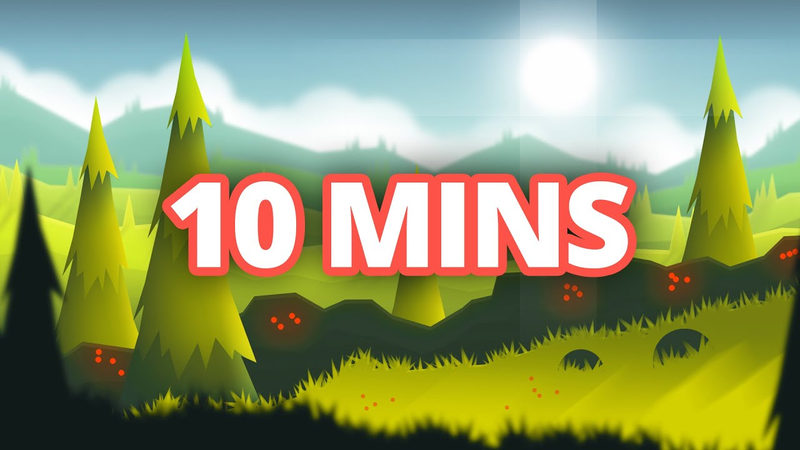
2D Game Art Tutorial (Stylized Landscape in 10 Minutes!)
Key insights
6 takeaways- 01Delineate walkable surfaces for the player by utilizing contrasting foreground elements to ensure gameplay clarity and visual focus.
- 02Use the polygon lasso tool to define distinct terrain layers and apply brush settings like angle and size jitter to introduce organic variation to assets such as grass and trees.
- 03Maintain consistent lighting logic by simulating a single light source, such as the top-left, to ground the artwork and create depth through shadows and motion-blurred gradients.
- 04Establish visual hierarchy and depth by layering background mountains, mid-ground hills, and foreground elements to simulate a three-dimensional environment within a 2D plane.
- 05Unify the final scene using post-processing techniques, including the application of subtle paper textures via overlay modes, color balance adjustments, and hue shifts.
- 06Accelerate development by creating modular game kits that can be integrated directly into engines like Unity to transition rapidly from static art to functional gameplay.
Ask AI about this video
Transcript
[Music] hey guys how's it going my name is thomas brush and i make indie games for a living i'm really really happy you could join me today i want to show you how we're going to create a beautiful summer austrian landscape i think it looks austrian maybe you can tell me in the comments let's go all right let's fill in the background with that sky color right all right so let's use the polygon lasso tool and just create some beautiful mountains in the background we're going to fill that in using that color right there good and let's just go forward and let's just move forward towards the camera using that same logic all right maybe one more layer here using that very vibrant green so this is the actual
ground that the player can walk on we're just gonna pick that greenish yellow there we go all right we're gonna add shadows between all the layers here the reason why is because right now they're kind of blending in with each other it kind of looks like one giant gradient so i'm going to do this good very subtle same is true with this very subtle same with this very subtle almost got it good okay and then one more and probably pull this one up just a little and drop it down just like that very subtle now let's add a little bit of a foreground element i kind of like to do it in the opposite angle of the actual ground the player can walk on i think that makes it look a little bit more interesting and one thing i want to add here is the
bushes or some element behind the actual ground that the player can walk on now why am i doing this the reason is because i want the player to know for certain what they can walk on okay there's a variety of ways of doing this in my case i'm literally going to just add some detailed well bushes here they could be stones they could be really anything but all they're going to do is sort of highlight and add some contrast to the actual ground the player can walk on now here's the thing we don't want them to be as dark as the foreground so let's maybe lighten them up just a little bit maybe something like that so i'm going to take this red i'm going to take the pencil tool and using the circle just add some berries to those bushes right nothing too complicated here awesome all right let's throw in some
clouds really really quickly here and just make some clouds isn't that beautiful i love that it's always fun creating these clouds once you finish up this simplistic artwork believe it or not you can just take these sprites and drag it into my 2d game kit now this is actually just a free game kit i'm not going to charge you for it click below it's totally free and you can download that 2d game kit and take artwork like we're working on right now and just throw it into unity and get it working and have a 2d game ready to go believe it or not i used this game kit to make a game for pewdiepie in 14 days so the game kit actually speeds things up a lot and i'm always about that feel free to click below one of my favorite things to do is just add some trees to every single layer now we don't want to make a ton of trees but just enough to make it look detailed so i can go to my brush tool here and you'll see that i've actually created a pine tree tool look i can
create some pine trees well we don't want them to be white let's make them this green color here i'm going to scale them down just a little bit [Music] okay and then finally let's start adding in some grass on this ground layer and i'm going to actually use my grass brush that i created it's just this simple burst of blades that i can start painting in the scene like this what i like to do is go to my brush settings and basically just go to my shape dynamics here increase the angle jitter right a little bit of size jitter and roundness jitter and that's going to make things look a little bit more random okay [Music] great okay all right now that we've got
our grass let's go ahead and start adding shadows to the scene this is going to make things really really pop i can't wait to show you this so here's the grass i'm going to actually just on top of it add in a shadow well how do i know which direction the shadow should go well let's just assume that the sun is coming from the top left-hand corner and maybe we'll even draw it in just a second so i'm going to take my polygon lasso tool and try and mimic what those bushes what kind of shadow they would create okay then i'm going to take my gradient tool and just pull down like that and then i'm going to add a little bit of a motion blur and that motion blur is going to simulate the shadow slowly dissipating away beautiful okay let's drop down the opacity here awesome that looks really really cool now the same is true with all of the background elements as well well what about these trees here
if the sun is coming from the top left hand corner well we'd have shadows that look kind of like this all right that looks pretty good kind of like it like that and we're going to drop the opacity down like this and i think towards the bottom here we can even add in a little bit of a shadow like this sweet there we go that looks great we dropped that down just a little bit that looks great let's use that same logic on these trees back here as well [Music] now we can start adding shadows to the hills themselves as well just to simulate texture depth
and maybe a little bit of warping occurring so i can just do something like this honestly do a little bit of a gradient and then decrease the opacity that looks pretty cool we could do the same with this one right here and all i'm doing is just mimicking how the ground looks but just varying it just a little bit so it looks 3d awesome one there and why not put one here as well it's really up to you when you want to start losing detail i kind of recommend once you hit the second to last background element you get really subtle with your shadowing really really subtle see that we could probably get away with adding one here on this final background element but it's really up to you just kind of guess and check it's
totally okay guys to not know exactly what looks perfect well until you try right and i'm still after 15 years of doing artwork for for video games i still am not quite sure what looks perfect save out our scene here and now we can start adding highlights to our scene as well convert everything on the bushes to a smart object then create an inner shadow here great that looks really really cool and then i'm gonna do another inner shadow and this one's gonna be more crisp okay so now we have this highlight inner shadow for the bushes that looks really really cool same is true with the background hills
all right something i want to do is add a big pine tree to this scene i think with any piece of artwork it's really important to throw in sort of that one object that you look at first that beautiful object and i think a giant pine tree right about here would be a good idea [Music] [Music] and also why not throw in a stone using the same color as the bushes and all you got to do with stones is just mask out using the grass see this is gonna blow your mind well i know it did for me when i learned how to do this it was so cool all right there we go
let's throw in a sun okay this is actually going to probably make the scene look maybe 20 times better okay games like altos adventure do this really really well what they do is they just create a sun let's see here drop the opacity down just a little bit although to be honest we could probably just do this so i'm going to blur the smart object of these clouds just like this oh that looks great i'm gonna make a smart object of these background trees do a subtle blur as well again i can change this later if i really want to let's blur the sun as well i'm gonna go to pexels.com and get a free texture i think this paper texture looks cool i really like using this one you guys have probably noticed i've used this for a lot of my games
i'm going to set it to overlay drop down the scale okay drop down the opacity significantly you just want a very subtle texture nothing crazy good okay and then i'm gonna add just a subtle color balance here just tweaking the colors just a little bit and then one final thing that i love to do is add a subtle hue shift probably usually in the top left hand corner or top right hand corner of my scenes something like this i'm gonna go to my pencil tool here i'm gonna take that red i'm gonna sign my name it's kind of hard using a mouse but hey not that bad right [Music]
alright guys that's my beautiful austrian landscape if you enjoyed this video if you learned a lot it would mean a ton to me if you click the like button subscribe to hit the notification bell to get notified of my next upload and leave a comment if you enjoyed this video or maybe you have some things you want to teach me i'd love to learn by the way if you want to get that 2d game kit it's totally free click below that 2d game kit is going to be able to take the artwork that you create bring those sprites into unity and create a game so much faster believe it or not i used this exact game kit to make a game for pewdiepie in 14 days and then i got to play it with him in front of his audience that was a really cool day all right guys i'll talk to you later take it easy
Summary
This guide outlines a streamlined workflow for creating stylized, ambient 2D game environments, specifically focusing on an alpine landscape. The process emphasizes the importance of visual hierarchy and depth to ensure gameplay clarity. By layering elements—such as background mountains, mid-ground hills, and foreground bushes—and utilizing subtle shadows and highlights, artists can create a sense of three-dimensional space within a flat 2D plane.
Key technical strategies include the use of the polygon lasso tool for defining distinct terrain layers and the application of brush settings, such as angle and size jitter, to introduce organic variation to assets like grass and trees. To maintain visual focus, the guide suggests using contrasting foreground elements to clearly delineate walkable surfaces for the player. Furthermore, the application of consistent lighting logic—such as simulating a sun source from the top-left—is essential for grounding the artwork and creating depth through shadows and motion-blurred gradients.
The workflow concludes with post-processing techniques designed to unify the scene. These include applying subtle paper textures via overlay modes, adjusting color balance, and using hue shifts to enhance the overall atmosphere. The guide advocates for the use of modular game kits to accelerate development, noting that these assets can be integrated directly into game engines like Unity to rapidly transition from static art to functional gameplay. This approach prioritizes efficiency and iterative design, encouraging creators to experiment with layering and lighting to achieve a polished, professional aesthetic.






















Comments